

On this page
Gemma 4 26B A4B and Gemma 4 31B run on an Apple silicon Mac with 24 GB of memory or more, and both run well at 4-bit on 32 GB. Off Grid AI Desktop lists both and runs them for free and offline. On a 16 GB Mac they only fit as 2-bit or 3-bit files, so Gemma 4 12B is the better pick there.
For most Macs, start with the 26B A4B. It’s a mixture-of-experts model, so it replies about as fast as a 4B.
Download Off Grid AI Desktop (free, no account)
What fits your Mac
Off Grid AI Desktop checks every download against your Mac’s memory. A model up to 65% of your memory Runs well. Up to 82% it’s Tight, which means it loads but leaves little room for long chats. Past that it’s Too big.
Sizes below include each model’s 1.2 GB vision file.
| Your Mac | Gemma 4 26B A4B | Gemma 4 31B |
|---|---|---|
| 16 GB | 2-bit or 3-bit, 11.1 to 12.6 GB: Tight. Use Gemma 4 12B | 2-bit UD-IQ2_XXS, 9.7 GB: Runs well. 3-bit: Tight |
| 24 GB (best pick) | 4-bit UD-IQ4_XS, 14.8 GB: Runs well | 3-bit Q3_K_M, 15.9 GB: Tight |
| 24 GB (app default) | App default 4-bit, 18.1 GB: Tight | App default 4-bit, 19.5 GB: Tight |
| 32 GB | App default 4-bit, 18.1 GB: Runs well | App default 4-bit, 19.5 GB: Runs well |
| 36 GB | 6-bit UD-Q6_K, 24.4 GB: Tight. 5-bit runs well | 5-bit Q5_K_M, 22.9 GB: Runs well |
| 48 GB | 8-bit Q8_0, 28.1 GB: Runs well | 6-bit Q6_K, 26.4 GB: Runs well |
| 64 GB or more | 8-bit: Runs well | 8-bit Q8_0, 33.8 GB: Runs well |
File sizes come from Unsloth’s Gemma 4 26B A4B and Gemma 4 31B files. The verdicts are the app’s own rule applied to those sizes. The app’s catalog lists the 31B for “24GB+ machines”, but at 24 GB its default 4-bit file reads Tight, so a 3-bit file is the comfortable choice there.
Gemma 4 26B A4B or 31B?
Both are from Google’s Gemma 4 family, under the Apache 2.0 licence. Both read text and images, think step by step when asked, and handle 256K tokens of context.
| Gemma 4 26B A4B | Gemma 4 31B | |
|---|---|---|
| Type | Mixture of experts | Dense |
| Parameters | 25.2B total, 3.8B active | 30.7B |
| Speed | Google says almost as fast as a 4B | Slower: every parameter works on every token |
| App default download | 18.1 GB | 19.5 GB |
Pick the 26B A4B on most Macs. It fits in less memory, replies much faster, and the app’s own quality ranking puts it slightly above the 31B.
Pick the 31B if you want to compare a dense model on your own work and your Mac has 32 GB or more.
How to set it up
- Download Off Grid AI Desktop, install it and open it.
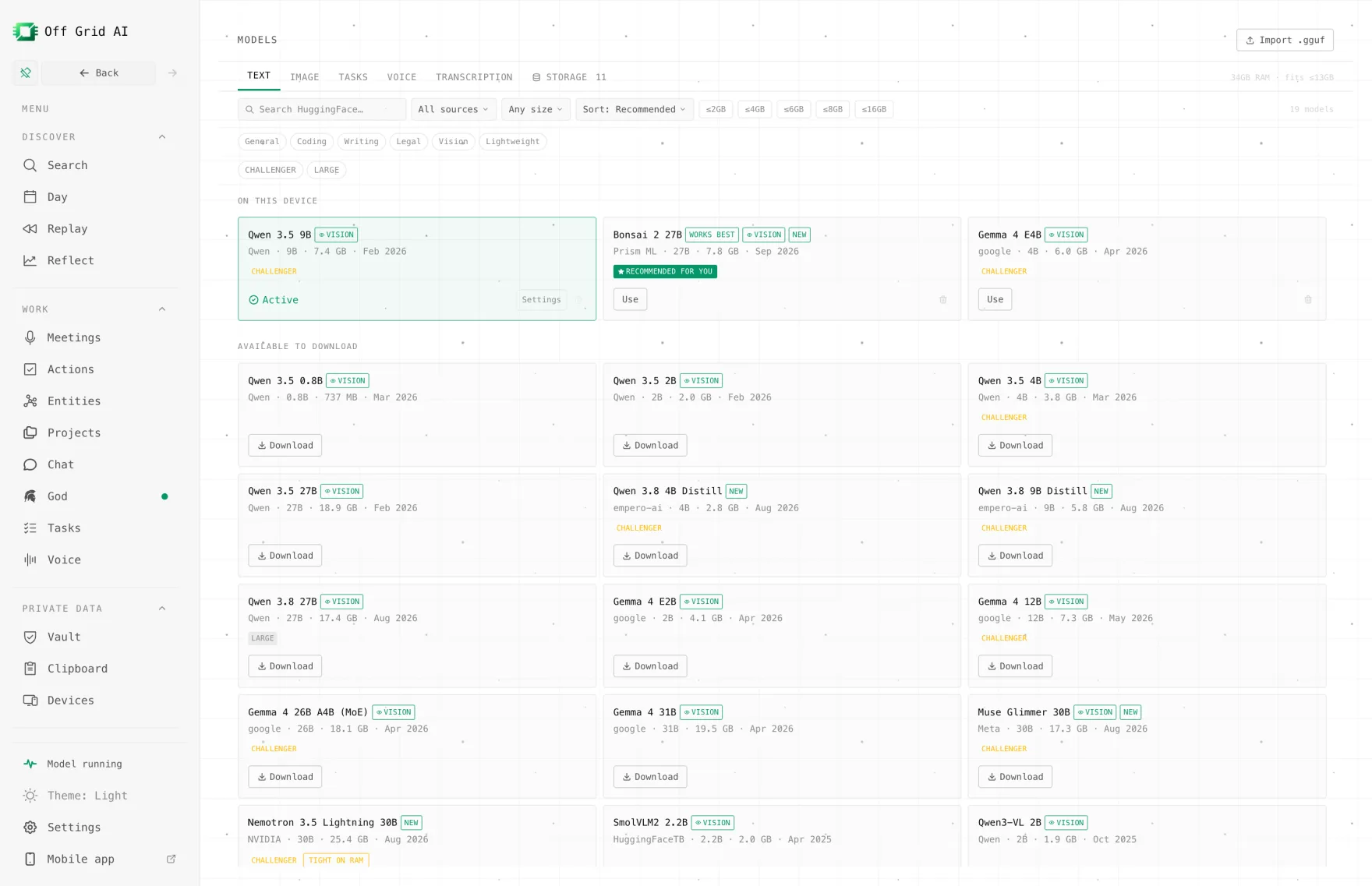
- Open Models > Text. Find Gemma 4 26B A4B or Gemma 4 31B, or type Gemma 4 in Search models…. The 26B card carries a MoE · 4B active tag.
- Pick the size for your Mac:
- 32 GB or more: choose Download for the default 4-bit file.
- 24 GB: click the card to open its panel. Under Sizes, pick the file from the table above. All files shows every size. Skip any marked Tight or Too big.
- 16 GB: download Gemma 4 12B instead.
- Wait for the model and its vision file to finish. That’s 15 to 20 GB, so use a fast connection.
- Open a new chat, select the model and ask something you can check.
Try a task that shows what a bigger model is for:
Here are my notes from three customer calls. List the problems more than one customer raised, and quote the line that shows each one.
Then paste your notes. To ask about a picture, attach an image to the chat. Turn off Wi-Fi and ask again. It keeps answering, because nothing leaves your Mac.
Keep it fast
- Leave memory free. Close heavy apps while it answers.
- Start a new chat per topic. A long history uses memory on every reply.
- Lower the context if it struggles. Open the model’s settings and reduce Context window. Most chats don’t need 256K tokens.
- Pick Runs well over Tight. A 4-bit file that fits beats a bigger one that runs out of room mid-chat.
If something goes wrong
| Symptom | Check | Fix |
|---|---|---|
| The card says Tight | Your Mac’s memory | Pick a smaller file in Sizes, using the table above |
| The card says Too big | Your Mac’s memory | Use Gemma 4 12B, or a smaller size |
| The 31B is slow | It’s dense | Try the 26B A4B, which replies much faster |
| Long chats get slow | Context window | Lower it, or start a new chat |
| Image questions fail | The vision file | Check it finished downloading |
| Download stops | Free disk space | Free up at least 25 GB |
Need a bigger model?
If your Mac has 16 GB and you want more than Gemma 4 12B, run Qwen 3.8 27B as Bonsai 2 27B, a compressed build that takes 7.2 GB plus a 0.63 GB vision file. Or use Off Grid AI Boost, a flat-price API for open models on our GPUs. Boost names Qwen 3.8 and DeepSeek V4.1 Flash on its list; it doesn’t list Gemma 4 yet. It’s from $4.99 a month for the first cohort, and we don’t store your prompts or train on them. Boost starts in January; pre-order to lock in half price. Usage limits aren’t published yet.
FAQ
Can a 16 GB Mac run Gemma 4 26B or 31B? Only as 2-bit or 3-bit files, and most of those read Tight in Off Grid AI Desktop. On 16 GB, Gemma 4 12B is the better pick. It’s a 7.3 GB download and runs well.
What’s the best Gemma 4 file for a 24 GB Mac? Gemma 4 26B A4B as a 4-bit UD-IQ4_XS file, 14.8 GB with its vision file. The app’s default 4-bit downloads for both models (18.1 and 19.5 GB) read Tight on 24 GB.
Gemma 4 26B A4B or 31B? On most Macs, the 26B A4B. It’s a mixture-of-experts model with 3.8B active parameters, so Google says it runs almost as fast as a 4B, and the app’s own quality ranking puts it slightly above the 31B.
Do Gemma 4 26B and 31B read images? Yes. Both take text and images. Off Grid AI Desktop downloads each model’s 1.2 GB vision file with it.
Does it work offline? Yes. After the download, Gemma 4 runs on your Mac with Wi-Fi off, and your chats stay on your disk.
Related guides
- How to Run Gemma 4 E4B and 12B Locally in Off Grid AI in 2026
- How to Run Gemma Locally on Your Computer in 2026
- How to Run Qwen 3.8 27B on Your Mac in 2026
- How to Run Gemma 4 on Your iPhone in 2026
Download Off Grid AI Desktop and run Gemma 4 on your Mac today.