

On this page
You can run a DeepSeek model on your iPhone itself, so your questions never reach DeepSeek’s servers. Off Grid AI Mobile (OGAM) is a free, open-source app that downloads DeepSeek R1’s smaller “distilled” models and runs them on the iPhone, with no account and no internet after the download. The catch is size. The full DeepSeek model is far too big for a phone, so the one you run is smaller and won’t answer as well as the DeepSeek app.
Download OGAM from the App Store
What does the DeepSeek app do with your chats?
DeepSeek’s privacy policy, last updated 10 February 2026, says three things worth knowing:
- It stores your personal data in the People’s Republic of China.
- It uses what you type, including prompts, uploaded files and chat content, to train and improve its models.
- You can opt out of training, but only by emailing [email protected]. There’s no switch in the app.
The model weights are a different story. DeepSeek publishes them openly under the MIT licence, so anyone can run them on their own hardware, and then nothing is sent to DeepSeek at all.
Which DeepSeek model fits your iPhone?
DeepSeek’s newest model, V4.1 Flash, has more than 500 billion parameters (model card). No phone can hold it. What fits are the R1 distills: smaller Qwen models that DeepSeek trained on R1’s step-by-step reasoning. They think out loud before they answer, the way R1 does.
OGAM’s search only offers files that fit your iPhone’s RAM, and marks the ones that only just fit as Tight. With the Q4_K_M files from Hugging Face:
| Your iPhone | DeepSeek model | Download | In OGAM search |
|---|---|---|---|
| 6 GB RAM (iPhone 13 Pro, 14, 15) | R1 Distill Qwen 1.5B | 1.1 GB | Runs well |
| 8 GB RAM (iPhone 15 Pro, 16, 17) | R1 0528 Qwen3 8B | 5 GB | Tight |
| 12 GB RAM (iPhone 17 Pro, 17 Pro Max) | R1 0528 Qwen3 8B | 5 GB | Runs well |
On an 8 GB iPhone the 8B only just fits, so it shows as Tight. On a 6 GB iPhone it’s Too big. File sizes are from Hugging Face (1.5B, 8B), and the fit rules are explained in how to find AI models your iPhone can actually run.
How to run DeepSeek on your iPhone
You need iOS 17 or later, OGAM from the App Store, and Wi-Fi for the download.
- Install OGAM and open it.
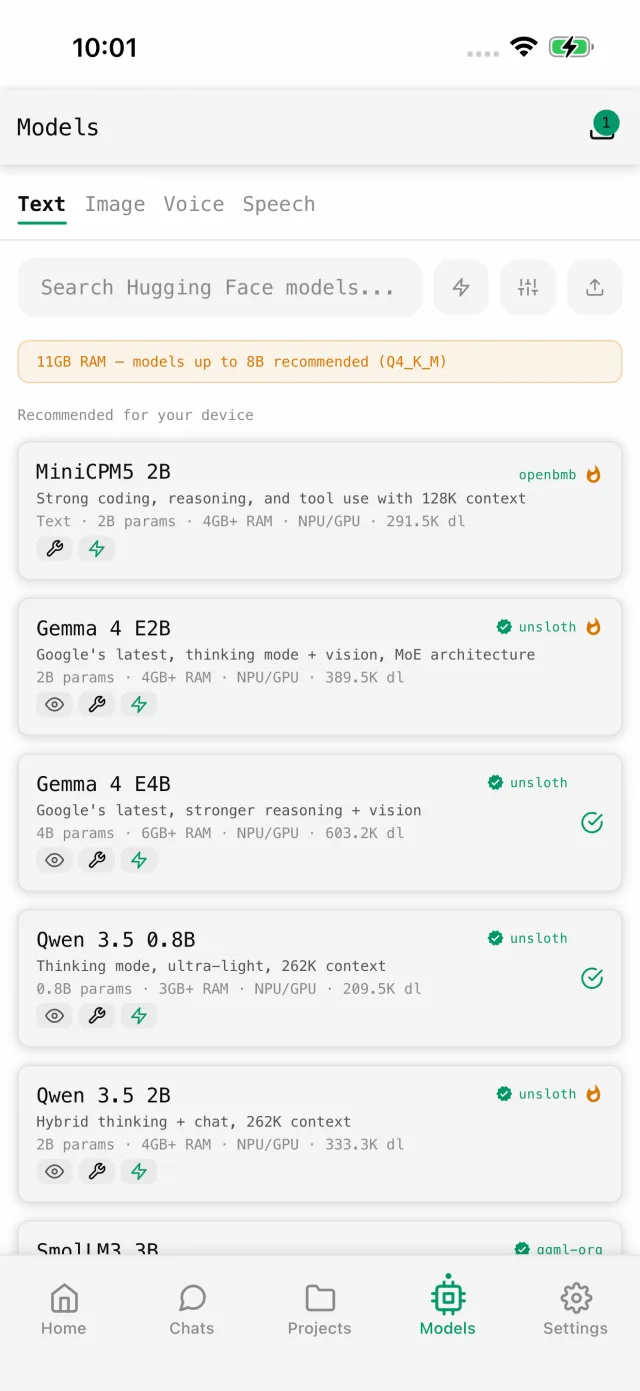
- Tap Models in the tab bar and stay on the Text tab.
- Tap Search models and type
deepseek r1. You can also tap the sliders icon, open Org and pick DeepSeek. - Tap a DeepSeek R1 Distill result. Under Sizes, pick Recommended, the best file for your iPhone.
- Tap download and keep the app open on Wi-Fi until it finishes.
- Tap Chat now and ask your first question.
From here it runs on the iPhone’s GPU through Metal. Turn on Airplane Mode and it still answers.
What to expect
- It thinks first. R1 distills write out their reasoning before the answer. That helps on maths and logic, but a simple question can take a while.
- It knows less. A 1.5B model is good for short reasoning, rewording and quick explanations. It gets facts wrong more often than the DeepSeek app, so check anything important.
- For everyday chat, try Qwen too. If you want quick answers without the long thinking, Qwen 3 4B (2.5 GB) is in OGAM’s catalog and runs well on an 8 GB iPhone.
- After setup, speed and battery depend on your iPhone. Newer chips reply faster, and long chats use more memory.
If something goes wrong
| Symptom | Check | Fix |
|---|---|---|
| No DeepSeek 7B or 8B in search | Your iPhone’s RAM | Files over 70% of your RAM are Too big. Use the 1.5B on a 6 GB iPhone. |
| The 8B fails to load on a 12 GB iPhone | Other apps open | Close heavy apps and try again, or pick the next size down. Your current model stays loaded if it fails. |
| Replies feel slow | Long reasoning | Ask shorter questions, or switch to Qwen 3 4B for everyday chat. |
| Download stalls | Wi-Fi and free storage | Stay on Wi-Fi. The app tells you how much space it needs when the download starts. |
Need the full-size model?
The full DeepSeek V4.1 Flash won’t fit on any phone. Off Grid AI Boost runs open models like DeepSeek V4.1 Flash and Qwen 3.8 on our own GPUs, with one API key for all of them, and we don’t store your prompts or train on them.
It’s one flat price from $4.99 a month for the first cohort ($9.99 regular), and that price holds for as long as you stay. Boost is a pre-order: your API key arrives in January 2027, and usage limits for each plan aren’t published yet. The Boost page says the same open models run in the Off Grid AI apps, and you choose where each one runs. Boost starts in January; pre-order to lock in half price.
FAQ
Can I run the real DeepSeek on an iPhone?
Not the full model. DeepSeek V4.1 Flash has more than 500 billion parameters. The R1 distills are official DeepSeek releases, built on Qwen and trained on R1’s reasoning, and they’re what fits a phone.
Is DeepSeek on my iPhone private with Off Grid AI?
Yes. The model runs on the phone. OGAM has no account, and your chats aren’t sent anywhere. You need internet only for the app and model downloads.
Is it free?
Yes. OGAM is free and open source, and DeepSeek’s weights are MIT licensed.
Is it as good as the DeepSeek app?
No. The app runs DeepSeek’s full model in a data centre. The model on your phone is a small fraction of that size, so expect simpler answers and more mistakes.
Does it work on a Mac?
The App Store version runs on Apple silicon Macs. On a Mac, Off Grid AI Desktop can run bigger DeepSeek models.
Download OGAM, search deepseek r1, and ask it something you wouldn’t type into the DeepSeek app.