

On this page
Qwen 3.8 27B runs on Windows on the graphics card you already own, as long as you pick the file that fits its memory. Off Grid AI Desktop runs it free and offline on Windows. Take the 16.5 GB 4-bit file on a 24 GB card, a 3-bit file on 16 GB, a 2-bit file on 12 GB, and Bonsai 2 27B (7.2 GB) on 8 GB or no GPU at all.
You don’t need an account, Python or a command line.
Download Off Grid AI Desktop (free, Windows x64)
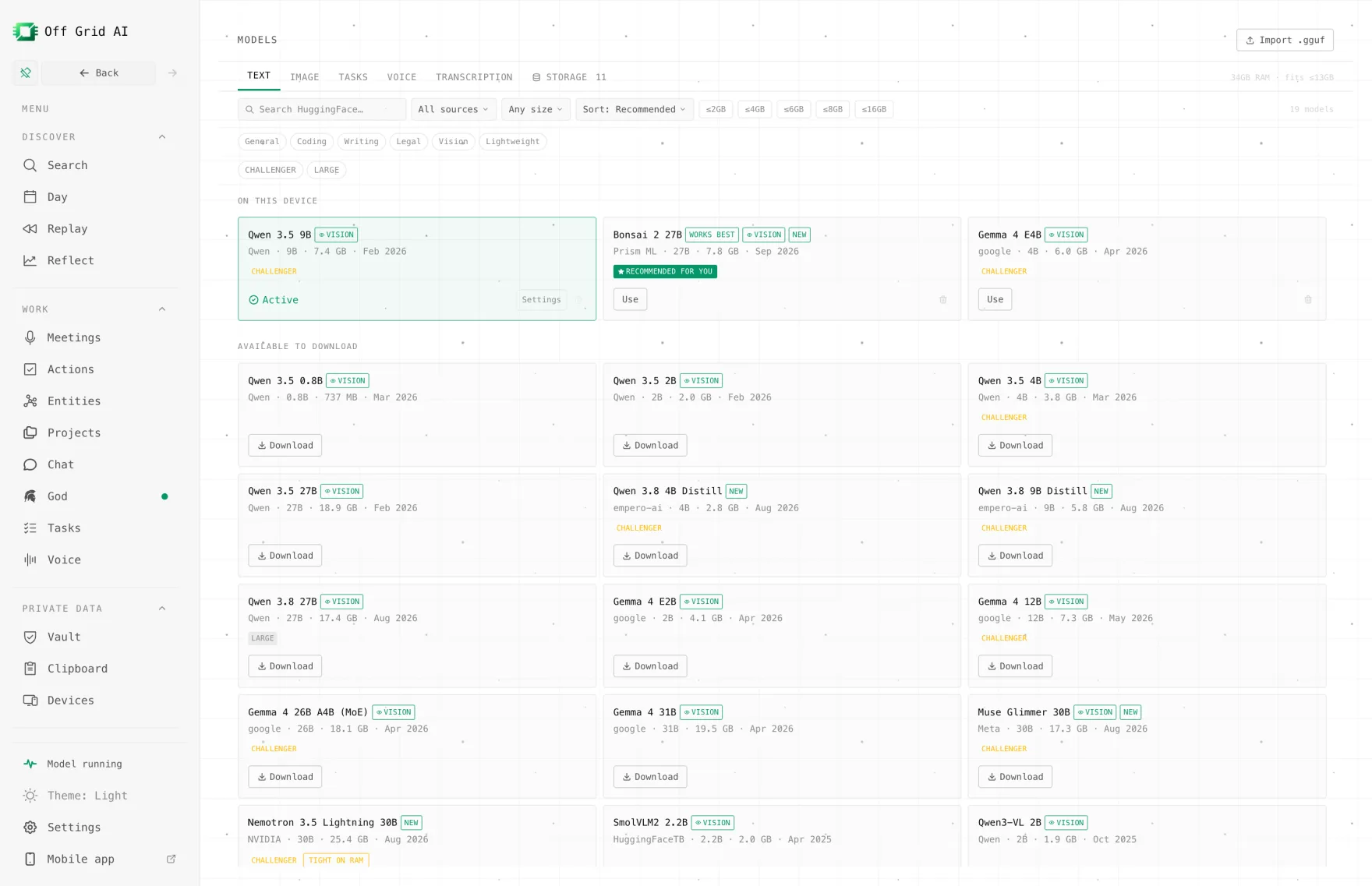
Which Qwen 3.8 27B file fits your GPU?
Qwen 3.8 27B is a dense 27B model that reads text, images and video, under the Apache 2.0 licence with a 262K context (model card). Dense means all 27B parameters work on every word, so the whole file wants to sit in your card’s memory (VRAM). Any part that doesn’t fit runs from system RAM, and replies slow down.
| Your GPU’s VRAM | Example cards | File to pick | Size |
|---|---|---|---|
| 32 GB | RTX 5090 | UD-Q6_K, or Q8_0 (8-bit) with a short context | 22.0 GB / 29.0 GB |
| 24 GB | RTX 4090, 3090, 7900 XTX | Qwen 3.8 27B 4-bit (in the app’s list) | 16.5 GB |
| 16 GB | RTX 5080, 5070 Ti, 5060 Ti 16 GB, 4060 Ti 16 GB | UD-IQ3_XXS or UD-Q3_K_XL (3-bit) | 10.9 GB / 13.1 GB |
| 12 GB | RTX 5070, 4070, 3060 12 GB | UD-Q2_K_XL (2-bit) | 9.95 GB |
| 8 GB or none | RTX 4060, 3070, laptops, CPU only | Bonsai 2 27B (in the app’s list) | 7.2 GB |
File sizes are from the Unsloth file list and the app’s catalog, checked 16 November 2026. Image questions add a 0.9 GB vision file (0.63 GB for Bonsai 2), which loads only when you send a picture.
Leave some VRAM spare. Windows itself uses part of the card, and your conversation needs memory too, more of it as the chat gets longer. That’s why the table puts a 13.1 GB file on a 16 GB card, not the 14.4 GB one.
Bonsai 2 27B is Prism ML’s build of Qwen 3.8 27B with every weight stored as -1, 0 or +1. Prism ML says it keeps 98.2% of the full model’s benchmark score. Off Grid AI Desktop bundles the engine it needs on Windows, for CPU, Vulkan and NVIDIA.
What you need
| Minimum | Comfortable | |
|---|---|---|
| Windows | Windows 10 or 11, x64 | Same |
| System RAM | 16 GB (Bonsai 2 27B) | 32 GB, the app’s guidance for the 4-bit file |
| GPU | None | 24 GB NVIDIA or AMD card |
| Free disk | about 8 GB | about 18 GB, plus about 8 GB for the NVIDIA download |
| Cost | Free | Free |
How to set it up on Windows
- Download Off Grid AI Desktop and run the installer.
- If you have an NVIDIA card, go to Settings → GPU performance. In Use your NVIDIA GPU, choose Download, then Restart app when it asks. AMD and Intel cards use Vulkan, which is already in the app, so skip this step.
- Open Models.
- For a 24 GB card, download Qwen 3.8 27B from Models > Text.
- For 8 GB or no GPU, download Bonsai 2 27B from the same list.
- For 12 or 16 GB, type Qwen3.8-27B into Search models…, open the Unsloth upload and pick the file from the table. Each file shows its size, and the app marks it Tight or Too big for your PC’s RAM.
- Start a chat and pick the model. In Model settings → Text, leave the backend on Auto or choose CUDA on an NVIDIA card.
- Send a short prompt. Then check the backend’s Now value to see which engine loaded, and GPU layers under Performance to see how many layers landed on the card.
Try something a 27B is good at:
Here’s a SQL query that returns duplicate customers when one has two addresses. Explain why and fix it so each customer appears once.
Qwen 3.8 thinks before it answers by default, so the first reply takes a few seconds longer than a small model’s.
After the download, it all runs on your PC. Turn off Wi-Fi and it keeps answering.
What if the file is a bit too big for your card?
It still runs. With GPU layers on Auto, the engine puts as many layers on the card as fit and runs the rest from system RAM. The display shows how many layers are on the card out of the total.
Each layer that runs from RAM makes replies slower, because a dense model uses every layer for every word. Two fixes are better than a big spill:
- Drop one quant size. A 3-bit file fully on the card beats a 4-bit file half off it for speed.
- Lower the Context window in Model settings. A smaller context frees VRAM for layers.
What goes wrong, and the fix
| Symptom | Check | Fix |
|---|---|---|
| Out of memory when it loads | File size against your VRAM | Pick the next smaller file from the table |
| Now shows Vulkan or CPU on an NVIDIA card | Whether the NVIDIA download finished | Download it in Settings → GPU performance and restart |
| Fast at first, slow in long chats | Context window in Model settings | Lower it, or start a new chat per topic |
| GPU layers shows far fewer layers than the total | The file spills off the card | Use a smaller file so it all fits |
| Image questions fail | The vision file | Leave about 1 GB of VRAM free for it, or use a smaller file |
| Bonsai 2 27B won’t load | The app version | Update the app; Bonsai 2 needs the bundled Prism engine |
If CUDA itself throws out-of-memory errors, our guide to fixing CUDA out of memory on Windows goes deeper.
Need the full-size model?
The files above are all compressed versions of Qwen 3.8 27B. The full 16-bit model is about 54 GB, which no consumer card holds. If you want it at full size without buying a 32 GB card, Off Grid AI Boost is a flat-price API for open models on our GPUs, with Qwen 3.8 and DeepSeek V4.1 Flash on the list.
Boost starts at $4.99 a month for the first cohort, with regular prices from $9.99 to $199.99. We don’t store your prompts or train on them. That’s our promise today, and the full policy comes with launch. Usage limits aren’t published yet.
Boost starts in January; pre-order to lock in half price. API keys arrive by January 2027.
FAQ
Which Qwen 3.8 27B quant should I use on an RTX 4090 or 3090? The 4-bit file. Off Grid AI Desktop’s catalog download is 16.5 GB, so it sits on a 24 GB card with room left for the conversation. UD-Q6_K at 22 GB also loads, but it leaves little room for the chat.
Which quant fits a 16 GB card like the RTX 5080, 5070 Ti or 4060 Ti 16 GB? A 3-bit file. UD-IQ3_XXS is 10.9 GB and UD-Q3_K_XL is 13.1 GB, and both stay on the card. The 4-bit file is bigger than 16 GB and spills into system RAM.
Can I run Qwen 3.8 27B on an 8 GB or 12 GB card? On 12 GB, use a 2-bit file such as UD-Q2_K_XL (9.95 GB) with a short context. On 8 GB, use Bonsai 2 27B, a 7.2 GB build of Qwen 3.8 27B that’s in the app’s list.
Can I run it without a GPU? Yes. Bonsai 2 27B runs on the CPU from system RAM, and Off Grid AI Desktop lists it for 16 GB of RAM. It’s slower than a graphics card, but it works.
Do AMD and Intel GPUs work? Yes, through Vulkan, which Off Grid AI Desktop includes on Windows. The NVIDIA download is only for NVIDIA cards.
Is it free? Yes. Off Grid AI Desktop is free and open source, with no account.
Related guides
- Is a 16 GB GPU Enough to Run Qwen 3.8 27B in 2026?
- How to Run Qwen 3.8 Privately on a 16GB Laptop in 2026
- How to Use Your NVIDIA GPU for Local AI on Windows in 2026
- How to Run Qwen 3.8 27B on Linux in 2026
Check your card’s VRAM in Task Manager under Performance, pick the matching file, and download Off Grid AI Desktop to run Qwen 3.8 27B tonight.