

On this page
You can run Qwen 3.8 27B privately on a laptop with 16 GB of RAM. Off Grid AI Desktop (OGAD) runs Bonsai 2 27B, a 7.2 GB build of Qwen 3.8 27B, on your own Mac, Windows or Linux laptop, with no GPU required and nothing sent to the cloud.
The standard 4-bit Qwen 3.8 27B file is 16.5 GB, which doesn’t fit in 16 GB of RAM. Bonsai 2 is how the 27B fits.
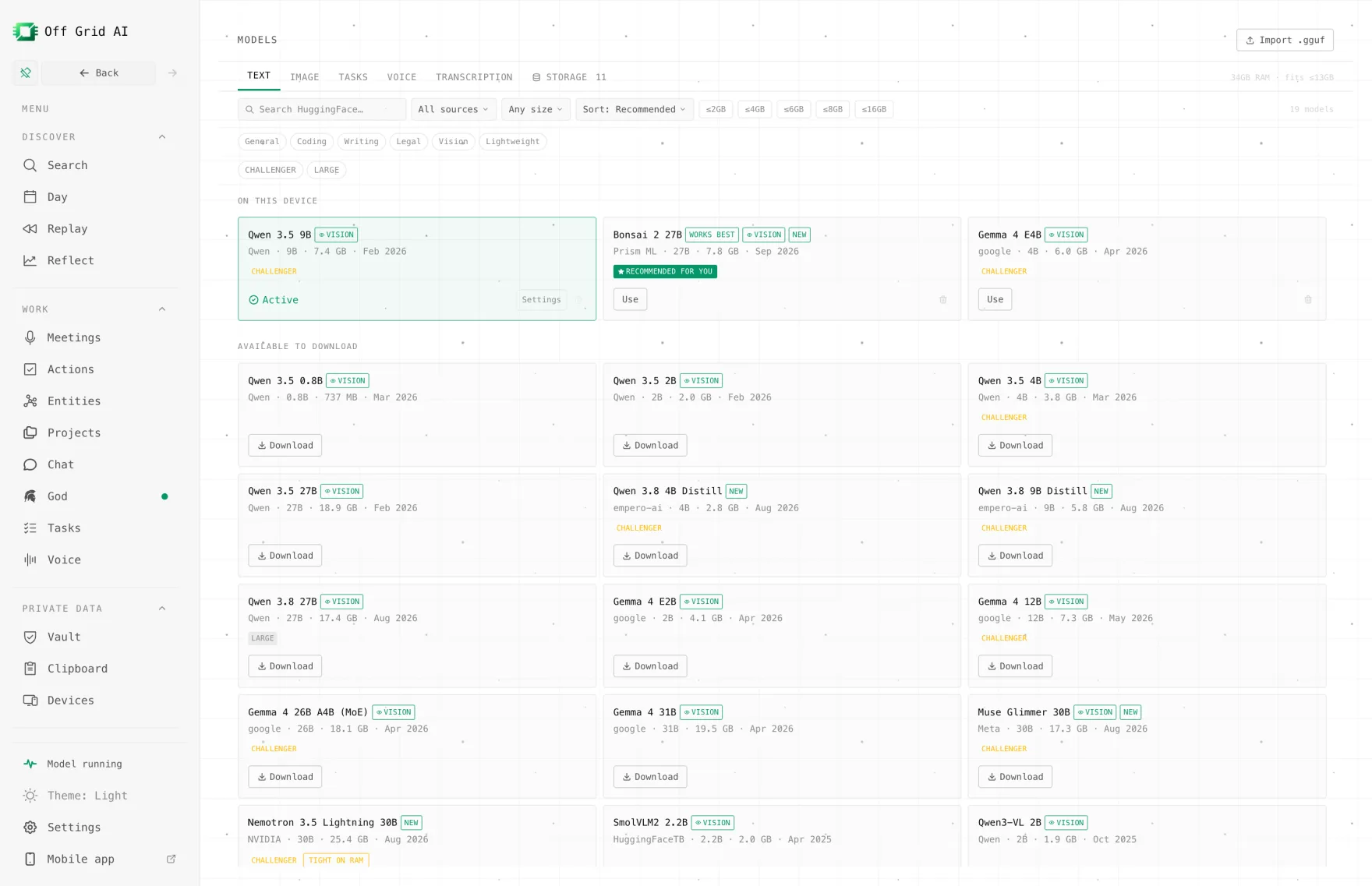
Which Qwen 3.8 fits in 16 GB?
Alibaba’s smallest open Qwen 3.8 is the 27B, a dense model that reads text, images and video under the Apache 2.0 licence. The other two open models, Qwen3.8-Flash-Next and Qwen3.8-2.4T-A95B, need 32 GB and 450 GB of RAM at their smallest. So on a 16 GB laptop the question is which 27B file to use.
| File | Size | Fits 16 GB? |
|---|---|---|
| Bonsai 2 27B (in OGAD’s list) | 7.2 GB + 0.63 GB vision file | Yes. OGAD lists it for 16 GB |
| Standard 3-bit (UD-IQ3_XXS) | 10.9 GB | Tight. Little room left for the system and context |
| Qwen 3.8 27B 4-bit (in OGAD’s list) | 16.5 GB | No. OGAD lists it for 32 GB |
Bonsai 2 27B is Prism ML’s build of Qwen 3.8 27B. It stores every language weight as -1, 0 or +1, so the model shrinks from about 54 GB to 7.2 GB. Prism ML says it keeps 98.2% of the full model’s score across 14 benchmarks. On the same benchmarks a standard 2-bit file of a similar size scored 72.59, against Bonsai’s 84.78.
That’s why Bonsai is the pick at 16 GB. You get the 27B’s reasoning at a size that leaves room for your browser and other apps.
What you need
| Mac | Windows or Linux | |
|---|---|---|
| RAM | 16 GB | 16 GB |
| Free disk | about 8 GB | about 8 GB |
| Runs on | Apple silicon GPU (Metal) | CPU, or Vulkan or an Nvidia GPU if you have one |
| Cost | Free | Free |
OGAD bundles Prism ML’s engine for Bonsai on Mac, Windows and Linux, so you don’t build anything yourself. Prism ML quotes about 47 tokens a second on an Apple M5 Max laptop. A 16 GB laptop will be slower, and a CPU-only PC slower again, but it answers.
How to set it up
- Download OGAD for your computer and install it.
- Go through first-run setup. On a 16 GB machine in the default Balanced mode, OGAD picks Bonsai 2 27B as your chat model when it fits.
- If setup picked something else, open Models > Text and download Bonsai 2 27B. It’s about 7.8 GB with the vision file, so use a fast connection.
- Open a new chat, select Bonsai 2 27B and ask something you can check.
Try a question that shows what a 27B is good at:
Here’s a function that’s supposed to remove duplicate emails from a list, but it keeps the wrong one when two differ only in capital letters. Explain the bug and fix it.
Then paste the code. Qwen 3.8 thinks before it answers by default, so the first reply takes longer than a small model’s.
To ask about a picture, attach an image to the chat. Bonsai 2 loads its 0.63 GB vision file only when you send one.
How OGAD fits a 27B into 16 GB
OGAD sizes the context window to your RAM. On a 16 GB Mac its best settings for Bonsai 2 use a context of about 16,000 tokens and a smaller 8-bit cache, instead of the model’s full 262,144 tokens. That’s plenty for a chat, a long email thread or a few pages of code.
For bigger jobs, start a new chat for each topic. A long chat history uses memory on every reply.
If something goes wrong
| Symptom | Check | Fix |
|---|---|---|
| Bonsai 2 27B isn’t offered at setup | Your RAM and the performance mode | Download it from Models > Text yourself |
| Replies are very slow | Other heavy apps open, or a CPU-only PC | Close other apps. On a PC with an Nvidia card, try the GPU |
| It runs out of memory on a long chat | Context size | Start a new chat, or shorten what you paste |
| You downloaded the 16.5 GB Qwen 3.8 27B | It’s listed for 32 GB | Remove it and use Bonsai 2 27B |
| Image questions fail | The vision file | Check the model’s 0.63 GB vision file finished downloading |
FAQ
Can Qwen 3.8 run on a laptop with 16 GB of RAM? Yes, the 27B can. Use Bonsai 2 27B in OGAD. It’s Qwen 3.8 27B packed to 7.2 GB by Prism ML, and the app lists it for 16 GB of RAM. The standard 4-bit file is 16.5 GB and needs 32 GB.
Do I need a GPU to run Qwen 3.8? No. On a Mac, OGAD uses Apple silicon’s built-in GPU through Metal. On Windows and Linux it can run on the CPU, or use Vulkan or an Nvidia card if you have one. A CPU is slower, but it works.
What is Bonsai 2 27B? Prism ML’s build of Qwen 3.8 27B with every language weight stored as -1, 0 or +1. It’s 7.2 GB instead of about 54 GB, keeps the vision input as a separate 0.63 GB file, and Prism ML says it keeps 98.2% of the full model’s benchmark score.
Is Qwen 3.8 Flash open? No. Qwen3.8-Flash is Alibaba’s API model. Its open base, Qwen3.8-Flash-Next, is a 125B mixture-of-experts model, and Unsloth says its smallest file needs at least 32 GB of RAM. On a 16 GB laptop, run Qwen 3.8 27B as Bonsai 2 instead.
What about the biggest Qwen 3.8? Qwen3.8-2.4T-A95B, the open model behind Qwen3.8-Max, needs at least 450 GB of RAM even at 1-bit, so it won’t run on any laptop. If you want it anyway, Off Grid AI Boost will serve Qwen 3.8 on our GPUs at one flat price. It’s a pre-order, and keys arrive by January 2027.
Is it private? Yes. The model runs on your laptop, so your prompts and files never leave it. After the download you can turn off Wi-Fi and keep chatting. There’s no account.
Related guides
- How to Run Qwen Locally on Your Computer in 2026 (Completely Offline)
- Can You Run Useful AI on a Computer Without an NVIDIA GPU in 2026?
- How to Run Qwen 3.8 on Your Android Phone in 2026
- How to Run Qwen 3.8 on Your iPhone in 2026
Download Off Grid AI Desktop and run Qwen 3.8 27B on your 16 GB laptop today.