

On this page
You can’t run the real Qwen 3.8 on an Android phone today, because the smallest open Qwen 3.8 is a 27-billion-parameter model and its usual 4-bit file is 16.5 GB. Off Grid AI Mobile (OGAM) gives you two ways that work: run Qwen 3.5 on the phone itself with no internet, or run Qwen 3.8 27B on your own computer and chat with it from your phone over your Wi-Fi.
Both are free, and neither sends your messages to a cloud AI service.
Google Play · Download Off Grid AI
Which Qwen 3.8 sizes exist?
Alibaba released three open Qwen 3.8 models in August 2026. None of them is phone-sized.
| Model | Size | Smallest usable file | Fits a phone? |
|---|---|---|---|
| Qwen3.8-27B | 27B dense, reads images and video, Apache 2.0 | about 7.2 GB at 2-bit, 16.5 GB at 4-bit | No, not well |
| Qwen3.8-Flash-Next | 125B with 6B active, plus a 51B n-gram table | needs at least 32 GB of RAM, says Unsloth | No |
| Qwen3.8-2.4T-A95B | 2.4 trillion with 95B active | about 397 GB at 1-bit | No |
Qwen3.8-Max and Qwen3.8-Flash are Alibaba’s API versions of the two bigger models. You can’t download those names.
The 27B is the one people mean when they say “run Qwen 3.8 locally.” Unsloth’s guide puts its 4-bit build at 16 to 19 GB of memory. Off Grid AI lists its standard 4-bit Qwen 3.8 27B download for machines with 32 GB of RAM, so it shows up on computers, not phones.
What runs on the phone itself: Qwen 3.5
Qwen 3.5 is the newest Qwen family with phone sizes, and it’s built on the same design Qwen 3.8 started from. OGAM has four sizes in its catalog:
| Model | RAM the app asks for | Model file |
|---|---|---|
| Qwen 3.5 0.8B | 3 GB | about 0.5 GB |
| Qwen 3.5 2B | 4 GB | about 1.3 GB |
| Qwen 3.5 4B | 6 GB | about 2.7 GB |
| Qwen 3.5 9B | 12 GB | about 5.7 GB |
Each one also has a small vision file, so it can read photos. Pick the biggest size your RAM allows. To check your RAM, open Android Settings, then About phone.
- Install OGAM from Google Play.
- Tap Models and search for Qwen 3.5.
- Download the size that fits your phone. Use Wi-Fi, because the 9B is almost 6 GB.
- Go to Home, tap Select Model and pick it.
- Tap New Chat and ask something.
Once it’s downloaded, turn on airplane mode and ask again. It still answers, because the model runs in your phone’s memory.
How to use Qwen 3.8 27B from your phone
If you have a computer, it can run Qwen 3.8 27B and your phone can talk to it. Off Grid AI Desktop (OGAD) has two versions in its model list:
- Bonsai 2 27B is Qwen 3.8 27B squeezed to about 7.2 GB by Prism ML, plus a 0.63 GB vision file. OGAD lists it for 16 GB of RAM. Prism ML says it keeps 98.2% of the full model’s benchmark score.
- Qwen 3.8 27B is the standard 4-bit file, 16.5 GB. OGAD lists it for 32 GB of RAM.
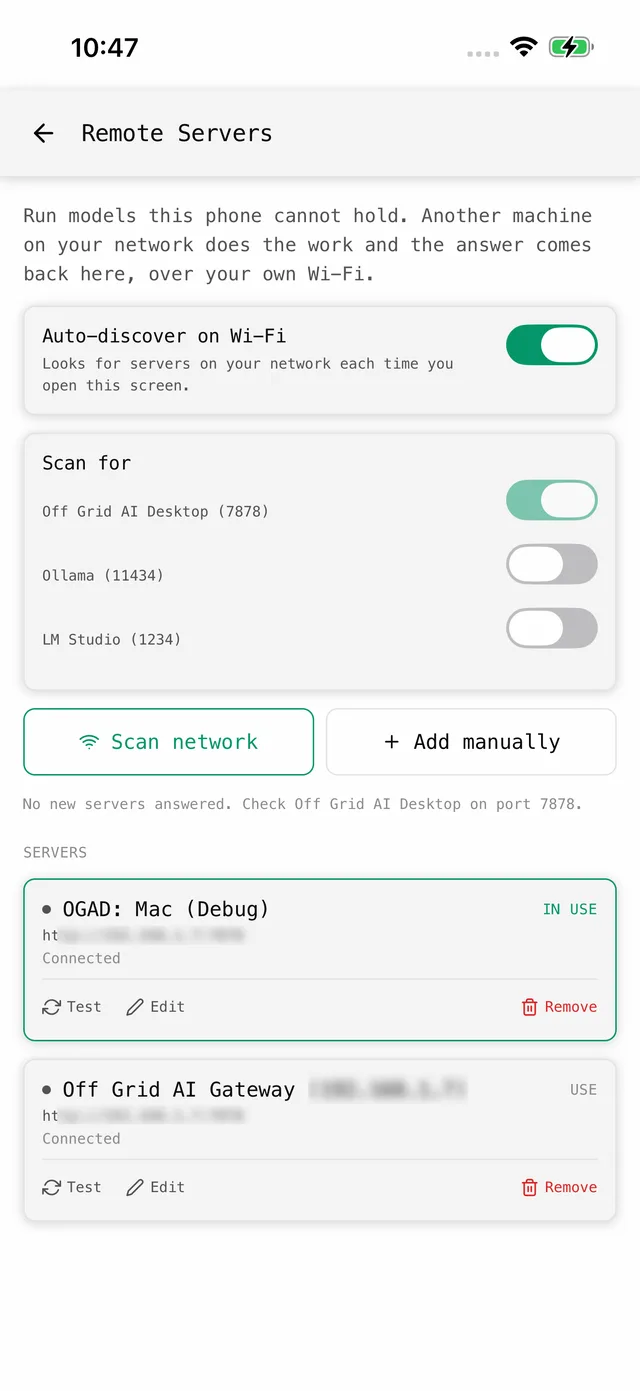
- On your computer, install OGAD, open the Models screen and download Bonsai 2 27B (16 GB of RAM) or Qwen 3.8 27B (32 GB or more).
- Ask it a question in OGAD to check it answers. Keep OGAD open and the computer awake.
- Put your phone on the same Wi-Fi as the computer.
- In OGAM, open Settings, then Remote servers.
- Under Scan for, turn on Off Grid AI Desktop (7878) and tap Scan network.
- When your computer shows up, tap Test, pick the Qwen 3.8 model as the text model and use the server.
- Start a new chat on the phone. The computer does the work and the answer comes back to your phone.
If the scan finds nothing, tap Add manually and type your computer’s local address, like http://192.168.1.50:7878. Don’t type localhost, because on the phone that means the phone itself. The full phone-to-computer guide covers the rest.
This works without internet as long as the phone and computer share a working Wi-Fi network. It’s plain HTTP on your local network, so use it on a network you trust.
For the full-size Qwen 3.8 from your phone, Off Grid AI Boost runs it on our GPUs at one flat price. It’s a pre-order, and keys arrive by January 2027.
Can I force a 2-bit Qwen 3.8 27B onto a 12 GB phone?
You can search Hugging Face from OGAM and download any GGUF file, and the smallest Qwen 3.8 27B files are 6 to 7 GB. We haven’t tested one on a phone, so we don’t list it. A dense 27B reads every weight for every word, so it’ll be much slower than Qwen 3.5 9B. Standard 2-bit files also lose a lot, and Prism ML measured a standard 2-bit build at 72.59 on its benchmark average, against 84.78 for Bonsai 2. Bonsai 2 itself needs Prism ML’s own engine, which OGAD ships and the phone app doesn’t yet. If you try a 2-bit file anyway, close other apps first.
If something goes wrong
| Symptom | Check | Fix |
|---|---|---|
| Qwen 3.8 27B doesn’t show in the phone’s model list | It’s listed for 32 GB of RAM | Run it on your computer and connect from Remote servers |
| The app warns a Qwen 3.5 size may not fit | Your phone’s RAM, and other apps open | Close other apps, or pick the next size down |
| Scan network finds nothing | Same Wi-Fi, OGAD open, no guest network | Tap Add manually and enter the computer’s IP with :7878 |
| Connected, but no Qwen 3.8 to pick | The model isn’t downloaded in OGAD | Download it on the computer and ask it one question first |
| Answers stop when you leave home | This only works on your own network | Use Qwen 3.5 on the phone when you’re out |
FAQ
Can Qwen 3.8 run on an Android phone? Not well. The smallest open Qwen 3.8 is the 27B, and its usual 4-bit file is about 16.5 GB, more memory than any normal phone has. Off Grid AI lists it for computers with 32 GB of RAM. On the phone itself, run Qwen 3.5 instead.
Which Qwen fits on my Android phone? Qwen 3.5. In OGAM, Qwen 3.5 0.8B needs 3 GB of RAM, 2B needs 4 GB, 4B needs 6 GB and 9B needs 12 GB. Pick the biggest one your phone’s RAM allows.
How do I use Qwen 3.8 27B from my phone? Run it on your own computer with OGAD, then connect from OGAM in Settings, Remote servers. The computer does the work and the answer comes back to your phone over your own Wi-Fi.
Is Qwen 3.8 Flash open? No. Qwen3.8-Flash is Alibaba’s API model. Its open base, Qwen3.8-Flash-Next, is a 125B mixture-of-experts model that Unsloth says needs at least 32 GB of RAM, so it doesn’t fit a phone either.
Is it free? Yes. Running Qwen 3.5 on the phone, running Qwen 3.8 27B on your computer and connecting the two are all free in Off Grid AI. There’s no account and nothing goes to a cloud AI service.
Related guides
- How to Run Qwen 3.5 on Your Android Phone in 2026 (Locally, No Cloud)
- How to Use AI Models on Your Mac From Your Android Phone in 2026 (No Internet Required)
- How to Run Qwen 3.5 and Gemma 4 Faster on Your Android Phone in 2026
- How to Run Qwen 3.8 Privately on a 16GB Laptop in 2026
Get Off Grid AI on Google Play and download Qwen 3.5 for your phone today.