

On this page
The best AI agent that can use your computer with local models in 2026 is Off Grid AI, because it clicks and types in your own apps and browser on a model running on your machine, with no cloud computer in between. Off Grid AI Desktop (OGAD) Pro does this on Mac, Windows and Linux, and it waits for your yes before each task starts. You pay for Pro once, and the same key also covers meetings, memory, dictation and sync.
Get Pro for $34.99 once · Download Off Grid AI
We make Off Grid AI, so read our pick with that in mind. Every fact about the other five comes from their own pages, checked 14 November 2026.
How we ranked
- It uses your computer. It clicks and types in real apps or a real browser.
- The model runs on your machine. No rented cloud computer does the thinking.
- Setup. What you have to install before the first task.
- You stay in control. You can approve, watch and stop what it does.
The ranking at a glance
| Runs on | Local models | Setup | Where it works | Asks before acting | Price | |
|---|---|---|---|---|---|---|
| 1. Off Grid AI | Mac (Apple silicon), Windows, Linux | Built in | Download the app | Your desktop apps and browser | Yes, each task | Free app; Pro $34.99, paid once, or $7.99 a month |
| 2. Browser Use | Not listed | Ollama or any OpenAI-compatible server | Python 3.11+ and code | Browser only | Not listed | Free library; cloud browsers $0.06 an hour |
| 3. Agent Zero | Anywhere Docker runs | Ollama and LM Studio listed | A0 Launcher and Docker | Its own Linux workspace | Its safety notes say review | Free |
| 4. UI-TARS Desktop | macOS, Windows | Guide uses a hosted endpoint | Download, then set a model URL and key | Desktop and browser | Not listed | Free; repository archived |
| 5. OpenHands | macOS, Linux, Windows | LM Studio, Ollama, vLLM | Node.js 24 and uv, or Docker | Code projects | Not listed | Free; Teams $500 a month |
| 6. Observer AI | macOS, Windows, Linux, web | Bundles llama.cpp | Download the app | Watches screen, camera and audio | Not listed | Free |
“Not listed” means the app’s own pages don’t list it.
1. Off Grid AI
What it is. OGAD is a free desktop app, and Pro adds two ways to hand it a task. Computer Use works in the apps on your screen. Web Use works in a browser window OGAD opens, or in your own signed-in Chrome or Firefox through the Off Grid AI extension.
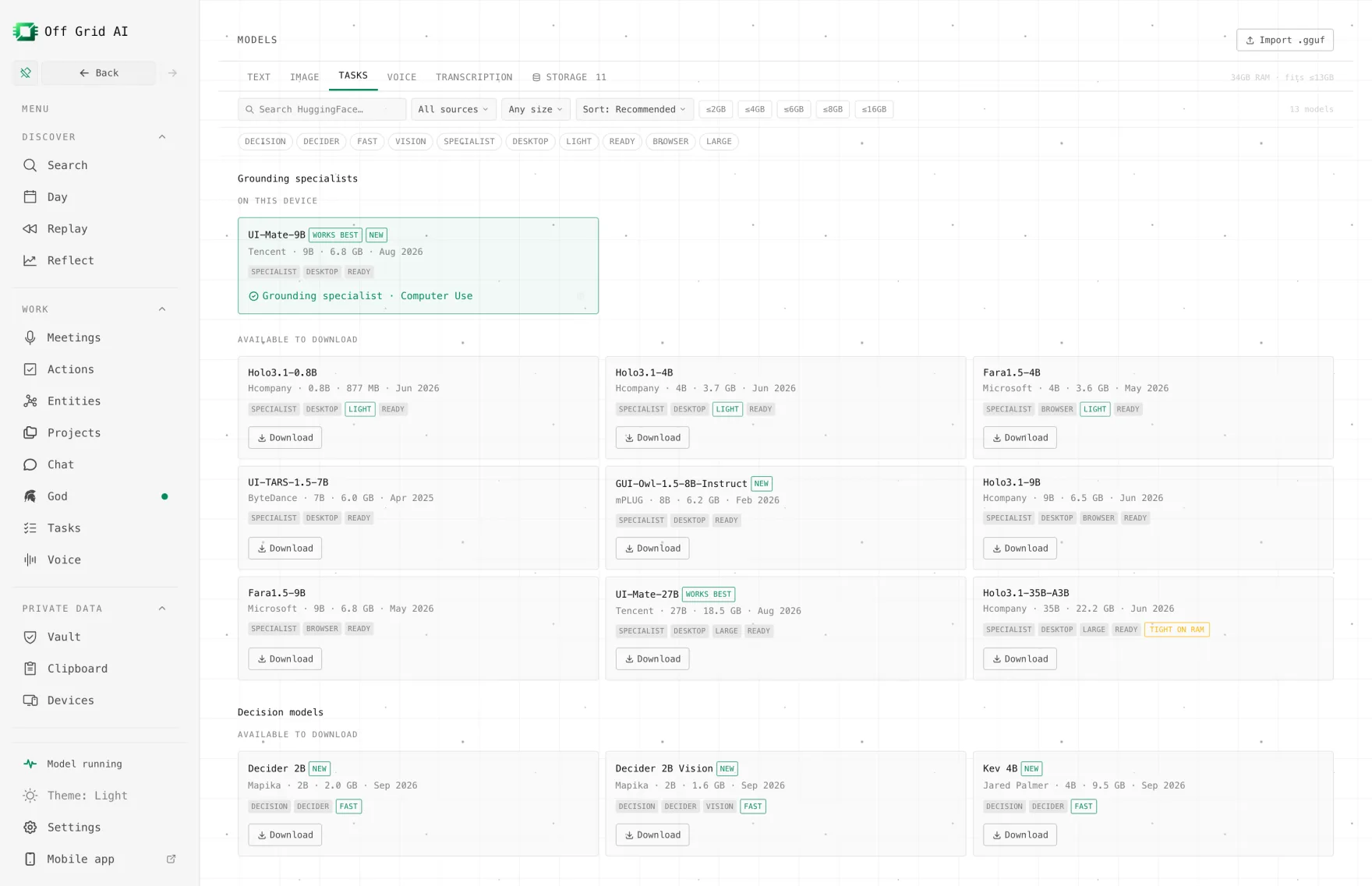
Local models, no extra server. You download models in Models and they run inside the app, so there’s nothing else to install. For Computer Use you can pair a chat model with a grounding specialist such as UI-TARS-1.5-7B or UI-Mate-9B, plus a decision model. The Kev 4B and Kev 9B decision models are built on Qwen3.5 and score each next action from the app’s accessibility data, and Kev 9B needs 32 GB of memory. On a Mac, Kev needs Apple silicon and macOS 14 or later. On Windows and Linux it runs through the app’s CUDA pack, so you’ll need an NVIDIA GPU.
You stay in charge. Every Computer Use or Web Use task waits for your approval before it starts. While it runs you can Pause, Stop or Take Over, or type a correction. Tasks keeps every run with its steps and screenshots, so you can check what it did afterwards. The extension is built to refuse codes, card numbers and CAPTCHAs.
Best for. You want an agent in your real apps and browser, on your own models, without touching Docker or Python.
Price. The app is free. Computer Use and Web Use need Pro: $34.99 once (limited time, regular $119) or $7.99 a month, for up to 5 devices.
The catch. You need Pro, and your computer has to stay on while it works. Models download once over the internet, and the sites and apps the agent uses still need their normal connection.
2. Browser Use
What it is. An open-source Python library for browser agents, per its GitHub README. The agent writes Python and drives Chrome through the DevTools Protocol.
Best for. Developers who’d rather script browser tasks in code. The README shows Ollama through ChatOpenAI(..., base_url='http://localhost:11434/v1') with a local Chromium.
Price. The library is free under MIT. Its pricing page lists cloud browsers at $0.06 an hour and hosted model use per token.
The catch. It only works in the browser. Out of the box it uses its own cloud model and a cloud browser, so running it locally is something you set up yourself. You’ll need Python 3.11 or newer.
3. Agent Zero
What it is. An open-source agent with its own Linux computer, per its README. It has a terminal, a browser that fills forms, plugins and MCP, and its site lists Ollama and LM Studio as providers.
Best for. Builders who want a sandboxed agent machine. The A0 Launcher covers Windows, macOS and Linux, and v2.15 shipped on 1 November 2026.
Price. Free and MIT licensed. Its site lists no paid plan.
The catch. It runs in Docker and works inside its own workspace, so it doesn’t drive the apps on your desktop. Its safety notes tell you to keep it isolated and to review actions that touch accounts or money. See Off Grid AI vs Agent Zero.
4. UI-TARS Desktop
What it is. ByteDance’s desktop app for a GUI agent driven by UI-TARS models, per its README. It lists Windows and macOS and has computer and browser operators.
Best for. Trying the UI-TARS model family in a ready-made app.
Price. Free under Apache-2.0.
The catch. The repository is archived and read-only on GitHub, and the last desktop release is v0.2.4 from 21 August 2025. Its quick start connects to UI-TARS-1.5 on a Hugging Face endpoint or to VolcEngine, each with a base URL and API key. It also says the app supports only a single monitor.
5. OpenHands
What it is. The OpenHands README now calls it Agent Canvas, a self-hosted control center for coding agents and automations.
Best for. Developers running coding agents on their own hardware. Its local LLM guide covers LM Studio, Ollama, vLLM and SGLang.
Price. Free under MIT. Its pricing page lists Teams at $500 a month for up to 10 users, and custom Enterprise.
The catch. It works on code projects and doesn’t drive your desktop apps. Without Docker, the README warns that the agent gets full access to your files. For its suggested local model, the guide asks for a GPU with 24 GB of VRAM or a Mac with 64 GB of memory.
6. Observer AI
What it is. A local-first agent that watches your screen, camera and audio and reacts, per its README. The desktop app bundles llama.cpp and can use Ollama or vLLM.
Best for. Alerts, such as a message when a download finishes.
Price. Free under AGPL-3.0.
The catch. It watches and tells you. Its desktop actions list a click, but its pages don’t describe it running multi-step tasks in your apps.
Which one should you pick
- You want an agent in your own apps and browser with no setup: Off Grid AI.
- You write Python and only need the browser: Browser Use, free under MIT.
- You want a sandboxed agent machine to build on: Agent Zero.
- You want coding agents on your own server: OpenHands. Off Grid AI isn’t built for that.
- You want free screen alerts on a local model: Observer AI.
- You don’t want to pay anything: pick one of the free tools above, because Off Grid AI’s task features need Pro.
Everything in one app
Most apps on this page do one job. Off Grid AI does all of these, on your own computer and phone, in one app.
Free, on every device
- Local chat with open models, no account
- Answers from your files, with the source shown
- Images made on your own GPU
- Voice in and out
- A local API for your own tools
- iPhone and Android with on-device models
Pro, $34.99 once
- Memory of your screens, meetings, mail and docs
- Meetings recorded without a bot, summarised locally
- Dictation into any app on your computer
- Actions in Gmail, Linear, Jira and Notion, only with your yes
- God, a chief of staff that briefs you and preps your meetings
- Web Use and Computer Use for tasks in your own browser and apps
- Reflect: where your time went, by project and person
- Vault, Clipboard and Sync on up to 5 devices
They work together
- A call becomes a transcript. Its decisions become to-dos. The follow-up email waits in Actions for your yes.
- God's morning brief draws on all of it: yesterday's screens, today's meetings, what people owe you.
- Vault fills logins in the same browser where Web Use runs a task, so the agent signs in and your password never goes to a model.
That is a notetaker, a dictation app, a time tracker, a password manager, a clipboard manager and an AI assistant, for one price. Get Pro for $34.99 once
Is there an AI agent that can use my computer and browser with local models? Yes. Off Grid AI Desktop Pro runs Computer Use in your desktop apps and Web Use in a browser, on models you download into the app. It works on Mac (Apple silicon), Windows and Linux, and every task waits for your approval before it starts.
Which free agents work with local models? Browser Use, Agent Zero, OpenHands, UI-TARS Desktop and Observer AI are free and open source. Browser Use and OpenHands connect to a local server such as Ollama. Agent Zero lists Ollama and LM Studio, and Observer AI bundles llama.cpp.
Do I need Docker or Python? Not for Off Grid AI, UI-TARS Desktop or Observer AI, because they’re desktop apps. Browser Use needs Python 3.11 or newer, Agent Zero runs in Docker, and OpenHands needs Node.js 24 and uv, or Docker.
Does a local agent work without internet? The model can. In Off Grid AI, models download once and then the thinking happens on your computer. The websites and apps the agent uses still need their normal connection.
What does Off Grid AI Pro cost? The app is free. Computer Use and Web Use need Pro, which is $34.99 once, a limited-time price down from $119, or $7.99 a month. One key covers up to 5 devices.
What does an AI agent that uses your computer cost over three years? OpenHands Teams at $500 a month for up to 10 users is $18,000 over three years. The Browser Use library is free, but its cloud browsers bill $0.06 an hour, so that cost grows with use. Agent Zero, UI-TARS Desktop and Observer AI are free. Off Grid AI Pro is $34.99 once, and the same key covers meetings recorded without a bot, dictation into any app, Memory of your screens and docs, and Vault, Clipboard and Sync.
Related guides
- How to automate tasks in your signed-in browser with local AI
- How to use multiple local AI models for computer tasks
- Simular Sai alternative: computer use on your own models
Get Off Grid AI Pro and let a model on your own computer do the clicking.