

On this page
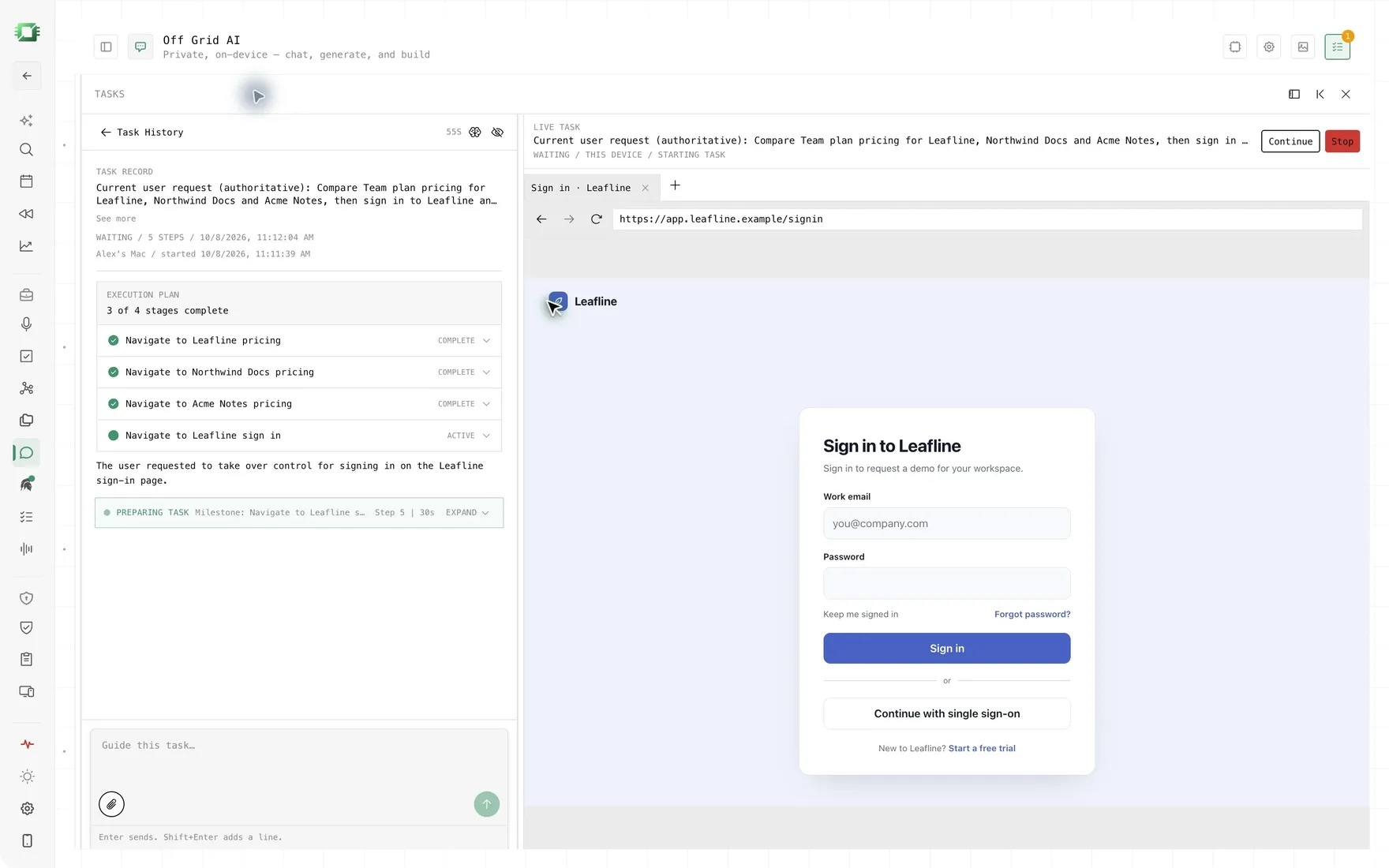
If you want an AI agent working in your own signed-in browser with the model on your own computer, Off Grid AI is the best pick in 2026. It runs tasks in the Chrome or Firefox you already use, while the model that reads each page and decides the next step runs in Off Grid AI Desktop on the same computer. When a step needs your password, a code, a card number or a CAPTCHA, it stops and hands it to you. You pay for Pro once, and the same key also covers Computer Use, meetings, memory and dictation.
Get Pro for $34.99 once · Download Off Grid AI · Chrome Web Store · Firefox Add-ons
We make Off Grid AI. Every rival fact below comes from its own pages, checked 14 November 2026.
How we ranked
- Your own browser. It works in the sessions you already have, with no remote browser in between.
- Where the model runs. A model on your computer ranks above a hosted one.
- What it refuses. Your passwords, codes, payments and CAPTCHAs should come back to you.
- Price. What you pay to use it every day.
The ranking at a glance
| Works in | Model runs | Hands sensitive steps to you | Price | |
|---|---|---|---|---|
| 1. Off Grid AI | Your Chrome or Firefox | Your computer (OGAD) | Passwords, codes, card numbers, CAPTCHAs, in code | Pro $34.99, paid once |
| 2. Nanobrowser | Your Chrome or Edge | Your choice: cloud key or Ollama, LM Studio | Payments, passwords, codes | Free, you pay your model provider |
| 3. Claude in Chrome | Your Chrome | Anthropic’s Claude | Asks before purchases and actions you can’t undo | Claude paid plans, from $17 a month yearly |
| 4. ChatGPT browser extension | Your Chrome, Edge, Brave, Opera, Vivaldi | OpenAI’s ChatGPT | Asks before each new site | Not listed on its page |
| 5. Gemini in Chrome | Your Chrome | Google’s Gemini 3 | Asks before purchases and social posts | Google AI Pro or Ultra |
| 6. Browser MCP | Your Chrome or Chromium browser | Whatever your MCP app uses | Not listed | Not listed |
| 7. BrowserOS | A separate browser | Your AI provider keys | Not listed | Free, open source |
“Not listed” means the app’s own pages don’t list it.
1. Off Grid AI
What it is. An extension for Chrome and Firefox that pairs with Off Grid AI Desktop (OGAD) on the same computer. OGAD plans each task and drives a background tab in your own browser, signed in as you.
Where the model runs. On your computer, with the local model you pick in OGAD. The extension talks to OGAD at 127.0.0.1:7878, or at a private-network address you set. If you pick a remote model in OGAD instead, the page text goes to that model. The websites still need the internet, and so does your first model download.
What it refuses. If the next step is a CAPTCHA or an “I’m not a robot” box, or would type into a password, one-time code, card number or CVV field, the task hands that step to you. The check lives in code, so it holds even when the model tries to go ahead.
Best for. You want the agent and the model on your own computer, in the browser you already use, Firefox included.
Price. Installing the extension is free and so is downloading OGAD. Chat and tasks from the extension need Off Grid AI Pro, at $34.99 once, a limited-time price down from $119, or $7.99 a month.
The catch. OGAD has to be running, and Edge, Brave and Arc are still on a waitlist. In Chrome you’ll see Chrome’s own “debugging this browser” bar while a task drives a tab. Pages that need visual control, such as canvas apps and maps, end the task and tell you why. The extension is young too, with version 0.0.6 shipped on 1 November 2026.
Chrome Web Store · Firefox Add-ons · Release notes
2. Nanobrowser
What it is. A free, open-source agent extension (Apache 2.0) for Chrome and Edge, per its site and GitHub. It works in your real, logged-in browser.
Where the model runs. Wherever you choose. You can use a cloud provider with your own API key, or a local model through Ollama, LM Studio or another OpenAI-compatible server.
Best for. You want a free agent you can point at a local model today, and you use Chrome or Edge. If you won’t pay for Pro, this is the one to get.
Price. Free. You pay your model provider, or nothing if the model is local.
The catch. You set up and run the local model server yourself, and there’s no Firefox version. Its README says the agent may not notice every step that needs your approval.
3. Claude in Chrome
What it is. Anthropic’s Chrome extension. Per its page, it reads the page you’re signed in to, then clicks, types and fills forms. It’s generally available.
Where the model runs. On Anthropic’s hosted Claude models.
Best for. Long, messy tasks, if you’re fine sending your pages to Anthropic.
Price. Any paid plan. Claude Pro is $20 a month, or $17 a month billed yearly.
The catch. It asks before purchases and actions you can’t undo, but its page still tells you to keep it away from banking, health records and passwords, and says its prompt-injection protections “aren’t foolproof”.
4. ChatGPT browser extension (Codex)
What it is. OpenAI’s extension, which you run from the ChatGPT desktop app. Per its docs, it reads or acts on sites where you’re already signed in.
Where the model runs. On OpenAI’s hosted models.
Best for. You already work in the ChatGPT or Codex desktop app and want the longest list of browsers.
Price. Not listed on the extension page.
The catch. It asks before each new website, and its “allow for all sites” option is marked elevated risk. The page doesn’t cover payments, passwords or CAPTCHAs.
5. Gemini in Chrome
What it is. Gemini built into desktop Chrome, with an agent mode called auto browse that runs multi-step chores in your Chrome, per Google’s announcement.
Where the model runs. On Google’s hosted Gemini 3.
Best for. You pay for Google AI and want an agent with nothing to install.
Price. Auto browse needs Google AI Pro or Ultra. Google’s plan page lists it for the US and India.
The catch. It pauses before purchases and social posts. With your permission it can sign in for you using Google Password Manager.
6. Browser MCP
What it is. A Chrome extension plus a local server that lets AI apps such as Claude Code, Cursor and Codex drive your browser profile, per browsermcp.io.
Where the model runs. In whichever MCP app you connect.
Best for. You’re a developer and want your coding agent to reach pages you’re signed in to.
Price. Not listed on its page.
The catch. You need Node.js 20 or later and an MCP app, and it lists no refusal for passwords, payments or CAPTCHAs.
7. BrowserOS
What it is. A free, open-source browser (AGPL-3.0) that agents drive with your logged-in accounts, per browseros.com.
Where the model runs. You bring your own AI provider keys and connect agents over MCP. Its site doesn’t mention local models.
Best for. Running several agents at once, with replays of each session.
The catch. It’s a second browser, so you sign in to your accounts again there. That rules it out if you want your own signed-in tabs.
Which one should you pick
- You want the model on your own computer, in Chrome or Firefox: Off Grid AI.
- You want it free and you use Chrome or Edge: Nanobrowser with Ollama or LM Studio. If you won’t pay for Pro, it’s the honest pick.
- You want the strongest hosted model and don’t mind the cloud: Claude in Chrome.
- You live in the ChatGPT or Codex app: the ChatGPT browser extension.
- You already pay for Google AI Pro: Gemini in Chrome.
- Your coding agent needs your logins: Browser MCP.
Everything in one app
Most apps on this page do one job. Off Grid AI does all of these, on your own computer and phone, in one app.
Free, on every device
- Local chat with open models, no account
- Answers from your files, with the source shown
- Images made on your own GPU
- Voice in and out
- A local API for your own tools
- iPhone and Android with on-device models
Pro, $34.99 once
- Memory of your screens, meetings, mail and docs
- Meetings recorded without a bot, summarised locally
- Dictation into any app on your computer
- Actions in Gmail, Linear, Jira and Notion, only with your yes
- God, a chief of staff that briefs you and preps your meetings
- Web Use and Computer Use for tasks in your own browser and apps
- Reflect: where your time went, by project and person
- Vault, Clipboard and Sync on up to 5 devices
They work together
- A call becomes a transcript. Its decisions become to-dos. The follow-up email waits in Actions for your yes.
- God's morning brief draws on all of it: yesterday's screens, today's meetings, what people owe you.
- Vault fills logins in the same browser where Web Use runs a task, so the agent signs in and your password never goes to a model.
That is a notetaker, a dictation app, a time tracker, a password manager, a clipboard manager and an AI assistant, for one price. Get Pro for $34.99 once
Is there an AI browser agent that works in my own signed-in Chrome tabs? Yes. Off Grid AI, Nanobrowser, Claude in Chrome, the ChatGPT browser extension, Gemini in Chrome and Browser MCP all work in the browser you’re already signed in to. BrowserOS is a separate browser, so you sign in to your accounts again there.
Which browser agent can use a model on my own computer? Off Grid AI runs the task model in Off Grid AI Desktop on your computer. Nanobrowser can use a local model through Ollama or LM Studio. Claude in Chrome, the ChatGPT extension and Gemini in Chrome use their makers’ hosted models.
Will a browser agent type my passwords or card numbers? Off Grid AI won’t. Its task code hands the step to you when the target is a password, a one-time code, a card number or a CAPTCHA, even if the model tries to type it. Nanobrowser also hands payments, passwords and codes back to you.
Does it work in Firefox? Off Grid AI’s extension is on Firefox Add-ons and the Chrome Web Store. Nanobrowser lists Chrome and Edge. The ChatGPT extension lists Chrome, Edge, Brave, Opera and Vivaldi.
Is Off Grid AI’s browser extension free? The extension is free to install and Off Grid AI Desktop is free to download, but chat and tasks from the extension need Off Grid AI Pro on the desktop, at $34.99 once or $7.99 a month.
What does an AI browser agent cost over three years? Claude in Chrome needs a paid Claude plan. Claude Pro at $17 a month billed yearly is $612 over three years, or $720 at $20 a month. Nanobrowser and BrowserOS are free, though with Nanobrowser you pay your model provider unless the model is local. Off Grid AI Pro is $34.99 once, and the same key covers Computer Use in your desktop apps, meetings recorded without a bot, dictation into any app and Memory of your screens and docs.
Related guides
- How to automate tasks in your signed-in browser with local AI
- How to use local AI in Firefox without moving to another browser
- Manus alternative: a browser agent with a local model
- Fellou alternative: automate Chrome with local AI
Get Off Grid AI Pro and run your next browser task with the model on your own computer.