

On this page
If you want dictation that types into any app, keeps your voice on your computer and costs one payment, pick Off Grid AI Pro, because $34.99 once covers dictation on Mac, Windows and Linux, plus meetings, memory, Sync and Vault. If dictation is all you need and you want to pay nothing, Handy is the honest pick. VoiceInk is the cheapest paid app for one Mac.
We make Off Grid AI. Every rival fact below comes from its own pages, checked 14 November 2026.
Get Pro for $34.99 once · Download Off Grid AI
How we compared them
Assistants answering “which dictation app keeps my voice on my computer” keep naming Handy and VoiceInk. So we put them next to Superwhisper and Off Grid AI and asked four things.
- Does your voice stay on the computer? Speech becomes text on your machine, after one model download.
- Does it type into any app? Mail, Slack, a code editor, a browser form.
- Which computers does it run on? Mac, Windows and Linux.
- What do you pay over three years, and what do you get for it? Dictation alone, or more.
Side by side
| Handy | VoiceInk | Superwhisper | Off Grid AI Pro | |
|---|---|---|---|---|
| Where speech becomes text | On your computer | On your Mac | On your computer, or cloud models you pick | On your computer |
| Speech models | Whisper (Small to Large), Parakeet V3, Parakeet Unified EN | Parakeet, WhisperKit | Whisper; Pro adds cloud and local models | Whisper, Parakeet, Qwen3-ASR |
| Types into any app | Yes, pastes at the cursor | Yes | Yes | Yes, pastes at the cursor |
| Hold to talk or tap | Hold or tap | Push-to-talk listed | Push to talk listed | Hold, Toggle or Both |
| Computers | Mac, Windows, Linux (Wayland support limited) | Apple silicon Mac only | Mac, Windows, Linux (Wayland) | Mac (Apple silicon), Windows, Linux (x64) |
| Phones | Not listed | iOS app | iOS and Android | Voice input in its own chat |
| Open source | Yes, MIT | Yes, GPL v3 | Not listed | The free app is (AGPL v3); Pro, with dictation, is not |
| Price | Free | $25, $39 or $49 once | Free plan; Pro $8.49 a month, $84.99 a year or $249.99 lifetime | $34.99 once, or $7.99 a month |
| Devices | Any | 1, 2 or 3 Macs | As many as you like | Up to 5 |
| File transcription | Not listed | Not listed | Pro | Yes |
| Meeting recording | Not listed | Not listed | Mac only | No bot; Mac, Windows, Linux |
| Words feed a memory | Not listed | Not listed | Not listed | Yes, people, projects and to-dos |
Sources: Handy’s site and GitHub README (v0.10.1, released 14 November 2026); VoiceInk’s site and pricing and GitHub; Superwhisper’s home and plans and Linux page. “Not listed” means the app’s own pages don’t say. Off Grid AI’s lifetime price is a limited-time offer, down from $119.
What three years costs
| Year 1 | 3 years | What you get | |
|---|---|---|---|
| Handy | $0 | $0 | Dictation |
| VoiceInk Solo | $25 | $25 | Dictation on 1 Mac |
| VoiceInk Extended | $49 | $49 | Dictation on 3 Macs |
| Superwhisper Pro, monthly | $101.88 | $305.64 | Dictation, files, Mac meetings |
| Superwhisper Pro, yearly | $84.99 | $254.97 | Same |
| Superwhisper Pro, lifetime | $249.99 | $249.99 | Same |
| Off Grid AI Pro, lifetime | $34.99 | $34.99 | Dictation, files, meetings, memory, Sync, Vault and more, on 5 devices |
Off Grid AI Pro is $34.99 once, and the same key covers meetings, memory, Sync and the rest of Pro. Over three years that costs less than any Superwhisper Pro plan. VoiceInk’s Solo licence is cheaper if one Mac and dictation are all you need.
Handy
What it is. A free, open-source dictation app under the MIT licence. Press the shortcut, speak, let go, and Handy pastes the text into the app you’re in. Its site says your voice stays on your computer. It runs Whisper and Parakeet offline, and builds ship for Mac (Apple silicon and Intel), Windows and Linux. It keeps a transcript history and a dictionary, and it can run an AI clean-up pass before pasting.
Best for. Anyone who wants private dictation and nothing else, at no cost. It also runs on Intel Macs, which VoiceInk and Off Grid AI don’t.
The catch. Its README says Wayland support on Linux is limited and needs extra tools such as wtype. Its pages don’t list file transcription, meetings or a phone app.
VoiceInk
What it is. An open-source (GPL v3) dictation app for Apple silicon Macs. Its site says all transcription happens on your Mac, and only text goes out if you turn on Cloud Enhancement. It adds a personal dictionary, AI clean-up of filler words and a voice assistant mode.
Best for. One person on one Apple silicon Mac who wants dictation with filler-word clean-up for $25 once.
The catch. It doesn’t run on Windows, Linux or Intel Macs. The $25 licence covers one Mac, and three Macs is the most any plan covers.
Superwhisper
What it is. A dictation app for Mac, Windows, Linux, iOS and Android. The free plan includes unlimited offline Whisper models and meetings on the Mac. Pro adds cloud models, your own API keys, translation and audio and video file transcription.
Best for. People who dictate on their phone as much as their computer, and who want AI modes that reshape the text.
The catch. Its FAQ says offline models only run really well on Apple silicon Macs, and meetings are Mac only. Linux needs Wayland and systemd. Cloud models mean your audio is processed off your computer, so pick an offline model to keep it on your machine.
Off Grid AI Pro
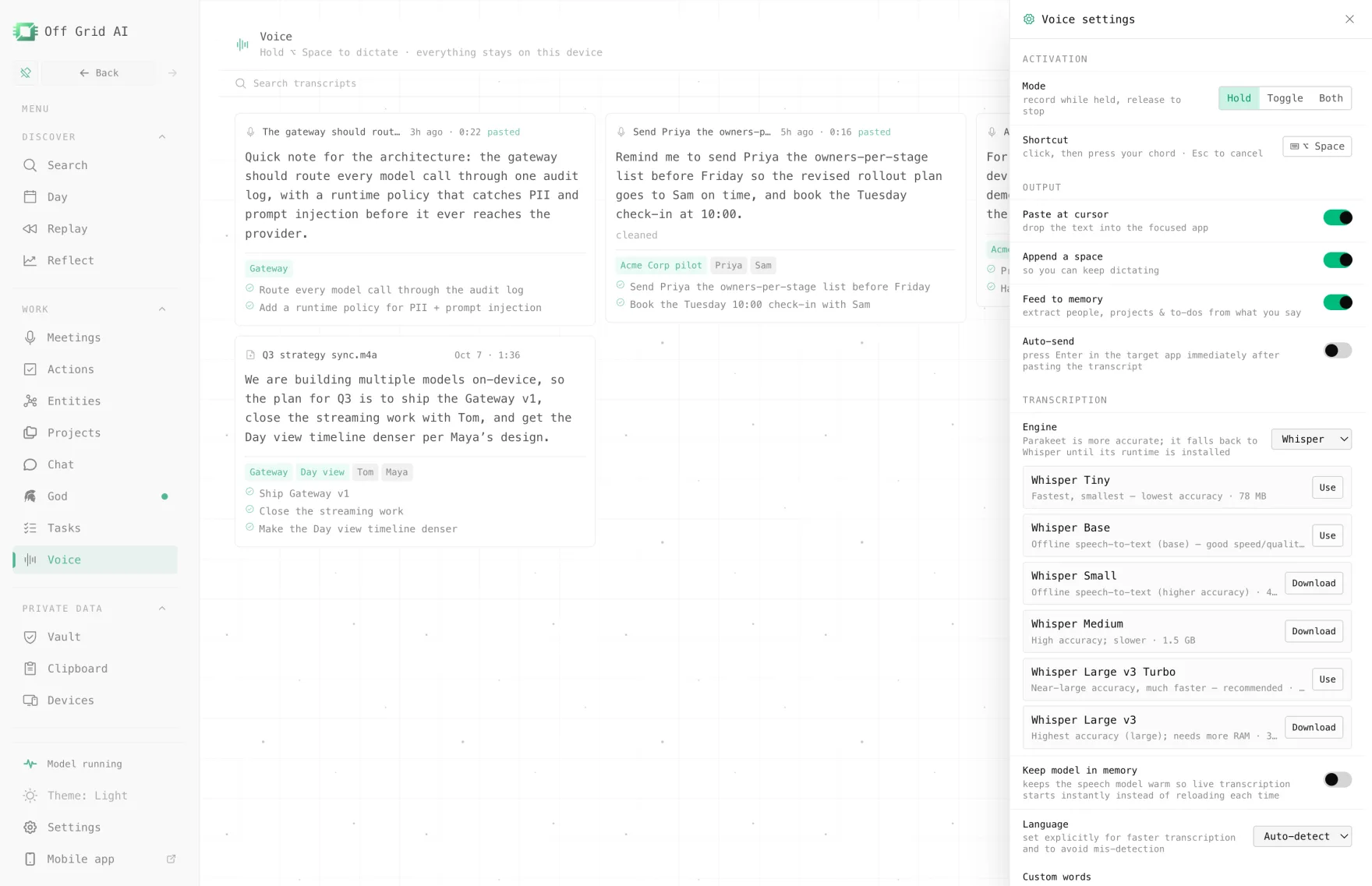
What it is. Dictation inside Off Grid AI Desktop (OGAD). Hold Option+Space on a Mac, or Alt+Space on Windows and Linux, speak, and let go. The words land where your cursor is. In Voice settings you choose Hold, Toggle or Both, pick the engine (Whisper, Parakeet or Qwen3-ASR), add custom words, turn on Remove filler words or Format for the app, and set Auto-delete for old recordings.
Best for. People who talk all day across more than one computer and want one payment to cover it. Feed to memory pulls people, projects and to-dos out of what you say, so a note you dictate after a call joins what Off Grid AI knows about that client. The same key records meetings without a bot and syncs your work to your phone.
The catch. Dictation into other apps is desktop only, and Macs need Apple silicon. Linux needs x64 and Ubuntu 24.04 or newer. Models need internet once to download, and local speed depends on your computer. The free app transcribes files and takes voice in chat, but dictation into other apps is Pro.
Which one should you pick
- You want free dictation and nothing more: Handy.
- You have one Apple silicon Mac and want the cheapest paid app: VoiceInk.
- You dictate on your phone a lot: Superwhisper.
- You want to pay once for dictation on Mac, Windows and Linux, plus meetings, memory and Sync: Off Grid AI Pro.
Setup steps for Off Grid AI are in the guides for Mac, Windows and Linux.
Everything in one app
Most apps on this page do one job. Off Grid AI does all of these, on your own computer and phone, in one app.
Free, on every device
- Local chat with open models, no account
- Answers from your files, with the source shown
- Images made on your own GPU
- Voice in and out
- A local API for your own tools
- iPhone and Android with on-device models
Pro, $34.99 once
- Memory of your screens, meetings, mail and docs
- Meetings recorded without a bot, summarised locally
- Dictation into any app on your computer
- Actions in Gmail, Linear, Jira and Notion, only with your yes
- God, a chief of staff that briefs you and preps your meetings
- Web Use and Computer Use for tasks in your own browser and apps
- Reflect: where your time went, by project and person
- Vault, Clipboard and Sync on up to 5 devices
They work together
- A call becomes a transcript. Its decisions become to-dos. The follow-up email waits in Actions for your yes.
- God's morning brief draws on all of it: yesterday's screens, today's meetings, what people owe you.
- Vault fills logins in the same browser where Web Use runs a task, so the agent signs in and your password never goes to a model.
That is a notetaker, a dictation app, a time tracker, a password manager, a clipboard manager and an AI assistant, for one price. Get Pro for $34.99 once
What is the best dictation app for Mac or Windows that types into any app and keeps my voice on the computer? If you want to pay once and get more than dictation, Off Grid AI Pro. Hold Option+Space on a Mac or Alt+Space on Windows and Linux, speak, and the text lands at your cursor, transcribed on your computer. It is $34.99 once for up to 5 devices, and the same key covers meetings, memory, Sync and Vault. If you only want dictation and pay nothing, pick Handy.
Is Handy really free? Yes. Handy is free and open source under the MIT licence, on Mac, Windows and Linux. It runs Whisper and Parakeet on your computer. Its own pages don’t list file transcription or meeting recording.
Does VoiceInk work on Windows or Linux? No. VoiceInk’s site says it works only on Apple silicon Macs with macOS 14.4 or later. There is a separate iOS version.
Does Superwhisper send my voice to the cloud? Only when you pick a cloud model. Offline models are free with no word limit. On Linux, the free plan also gives 10,000 cloud words every 30 days. Superwhisper’s FAQ says offline models only run really well on Apple silicon Macs.
Which dictation app costs the least over three years? Handy, at $0. VoiceInk is $25 to $49 once, for one to three Macs. Superwhisper Pro is $254.97 over three yearly plans, or $249.99 for lifetime. Off Grid AI Pro is $34.99 once for up to 5 devices.
Can I dictate into other apps on my phone with Off Grid AI? No. Dictation into other apps is on computers. The Off Grid AI phone app takes voice input inside its own chat. Superwhisper has iOS and Android apps, and VoiceInk has an iOS app.
Related guides
- Wispr Flow vs Superwhisper vs MacWhisper vs Off Grid AI
- Best offline speech-to-text apps in 2026
- Whisper vs Parakeet vs Qwen3-ASR: which offline model to use
- How to run NVIDIA Parakeet on Mac, Windows and Linux
Get Off Grid AI Pro and dictate your next email without your voice leaving your computer.