

On this page
You can get back text you deleted from a Markdown note, even after you’ve saved and closed it. Notes, in Off Grid AI Desktop (OGAD) Pro, keeps earlier versions of every file it writes on your Mac, with no Git and no sync service. Open History, see what changed, and restore the version or copy just the paragraph you lost.
It covers the paragraph you cut by mistake, the note a sync conflict overwrote, and the draft you rewrote and then wanted back. The versions stay on your Mac.
Get Pro for $34.99 once · Download Off Grid AI for Mac
What you need
- An Apple silicon Mac with OGAD 0.0.57 or later, from the download page.
- Off Grid AI Pro, built into the app. Enter your licence key and click Activate. Pro is $34.99 once, a limited-time price down from $119, or $7.99 a month, for up to 5 devices.
- Your notes open in Notes. Click Notes in the sidebar, then open your Obsidian vault when it’s offered, click New library, or use Add a folder or file for any folder of Markdown.
History starts from the moment Notes has a file. It can’t recover edits from before you added the folder, but the file as it was when Notes first wrote to it is kept as its own version.
Step 1: Open History
- Open the note in Notes.
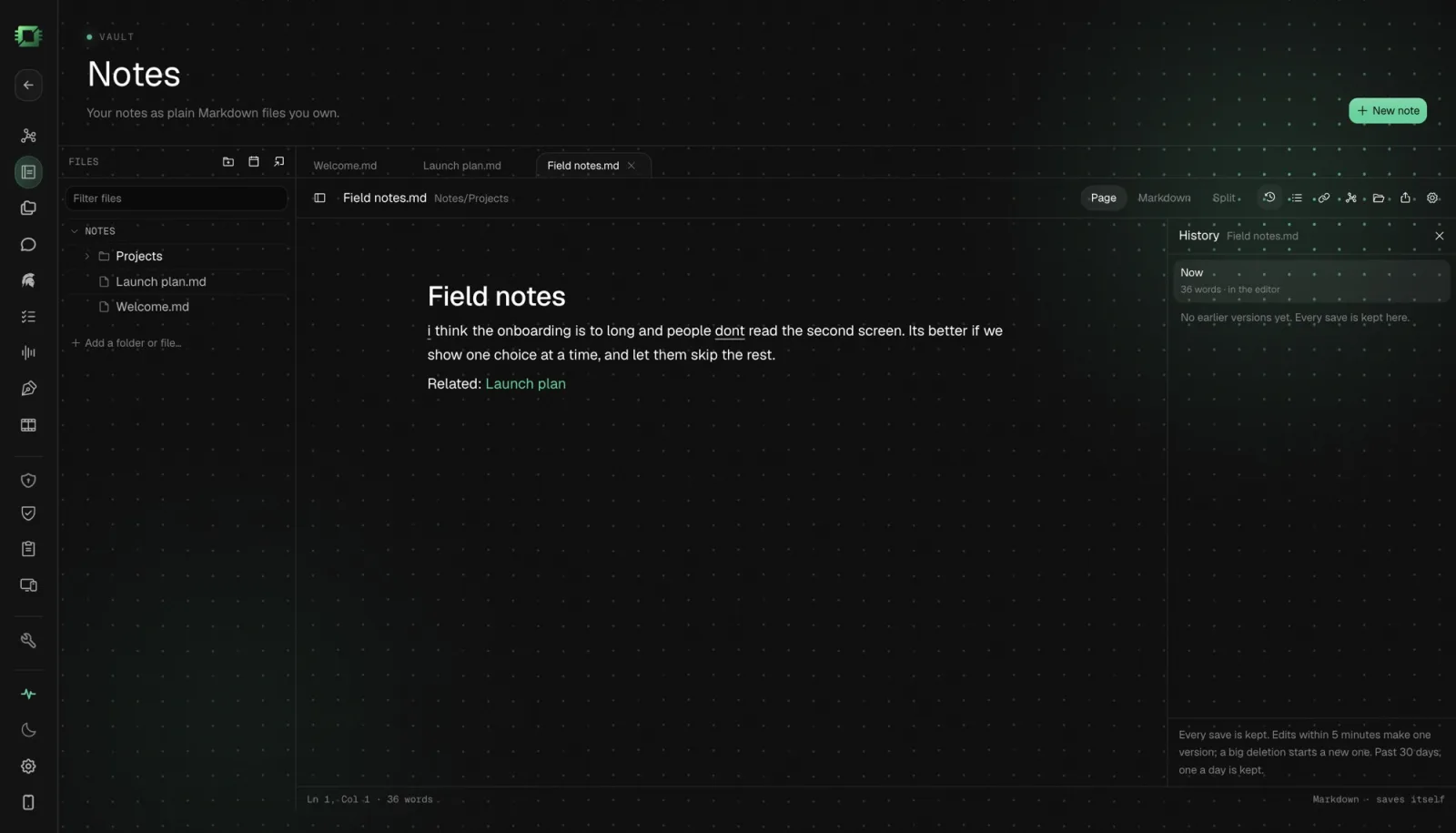
- Click History in the toolbar above the note. It’s the clock icon.
The panel lists earlier versions of this file, grouped by day, newest first.
Step 2: Find the version you want
Click a version. Then choose how to read it:
- Changes since shows what changed between that version and now. Deleted text is marked, so a missing paragraph is easy to spot.
- Full text shows the note exactly as it was.
Step back through the days until the text you want appears.
Step 3: Restore or copy
- Click Restore to bring the whole note back to that version. Changed your mind? One Command+Z undoes the restore.
- Click Copy to take the old text to your clipboard, then paste the part you need into today’s note. Everything you wrote since stays.
Click Back to editing or press Esc to close History.
What Notes keeps
Notes saves versions as you work, so you never press anything:
| What happens | What’s kept |
|---|---|
| You type for a while | Saves within five minutes fold into one version |
| You delete a big block | Its own version |
| You restore an old version | Its own version, so the restore can be undone |
| Obsidian or another app changes the file | Its own version |
| Notes writes a file for the first time | The file as it was before, as its own version |
| Text you chose not to keep | Kept in History too |
For older history, Notes keeps the last version of each day past 30 days, and it always keeps the newest 20 versions of every file.
History is stored in OGAD’s own data on your Mac, not in your notes folder. Your vault stays plain Markdown, and Obsidian sees nothing new.
Edit in Obsidian, recover in Notes
You don’t have to switch apps to be covered. Keep writing in Obsidian, with the same vault open in Notes and OGAD running. When Obsidian changes a note, Notes picks up the change from disk and keeps it as a version. Open Notes when something goes missing.
FAQ
How do I recover deleted text from a Markdown note on my Mac? Open the note in Notes in Off Grid AI Desktop Pro and click History. Pick an earlier version, choose Changes since to see what went, then Restore the whole version or Copy just the part you need.
Does it work for notes I edited in Obsidian or another app? Yes, for files Notes has open in its sidebar. A change made in another app gets its own version, and so does the file as it was before Notes first wrote to it.
How long are versions kept? Saves within five minutes fold into one version. After 30 days Notes keeps the last version of each day, and it always keeps the newest 20.
Does version history add files to my vault? No. History is stored in Off Grid AI’s own data on your Mac, not in your notes folder, so your vault stays plain Markdown.
What do I need? An Apple silicon Mac, Off Grid AI Desktop 0.0.57 or later, and an Off Grid AI Pro licence.
Related guides
- How to Keep Private Markdown Notes With Backlinks and a Graph on Your Mac in 2026 (Opens Your Obsidian Vault)
- How to Chat With Your Obsidian Notes in 2026 Without Uploading Them
- Best Obsidian Alternatives in 2026 (Private Markdown Notes With Local AI)
Get Off Grid AI Pro, open your notes in Notes, and from today every version is kept on your Mac.