

On this page
The best private Grammarly alternative in 2026 is Off Grid AI Pro, because its Scribe feature checks spelling and grammar in every app on Mac, Windows and Linux, and rewrites with a model on your own computer, for one payment. If you want free checks in English and no AI rewrites, Harper is the pick.
Grammarly reads what you type on its servers. Its privacy policy, now published by Superhuman, says it processes “your user content” to give writing suggestions. Every app below can do the checking on your own machine instead.
We make Off Grid AI. Every rival fact below comes from that app’s own pages or GitHub, checked 16 November 2026.
Get Pro for $34.99 once · Download Off Grid AI
The private grammar checkers compared
| Price | Devices | Checks on your computer | Works in other apps | AI rewrites on your computer | |
|---|---|---|---|---|---|
| Off Grid AI Pro (Scribe) | $34.99 once, up to 5 devices | Mac (Apple silicon), Windows, Linux, plus iPhone and Android | Yes | Yes, plus one shortcut everywhere | Yes, with a local chat model and your style guide |
| Harper | Free, open source (Apache-2.0) | Mac app; browser and editor plugins everywhere | Yes | On Mac, and through its browser and editor plugins | No AI rewrites |
| Apple Writing Tools | Included with macOS | Macs with Apple Intelligence (M1 or later) | On-device, with larger requests on Apple’s Private Cloud Compute | Yes, in most places you write | On-device or Private Cloud Compute |
| Writing Tools (open source) | Free (GPL-3.0) | Windows, Mac (macOS 14+), Linux | Only with a local model you set up | Yes, select and press Ctrl+Space | Only if you point it at Ollama or llama.cpp |
| LanguageTool | Free plan; Premium paid | Browser add-ons, Mac, Windows | Only as a self-hosted Java server | Through its add-ons | AI rules run in its cloud |
Sources: Harper and GitHub (v3.2.0, 13 November 2026); Apple Writing Tools and Apple Intelligence; Writing Tools on GitHub; LanguageTool Premium and its local server docs.
1. Off Grid AI Pro (Scribe)
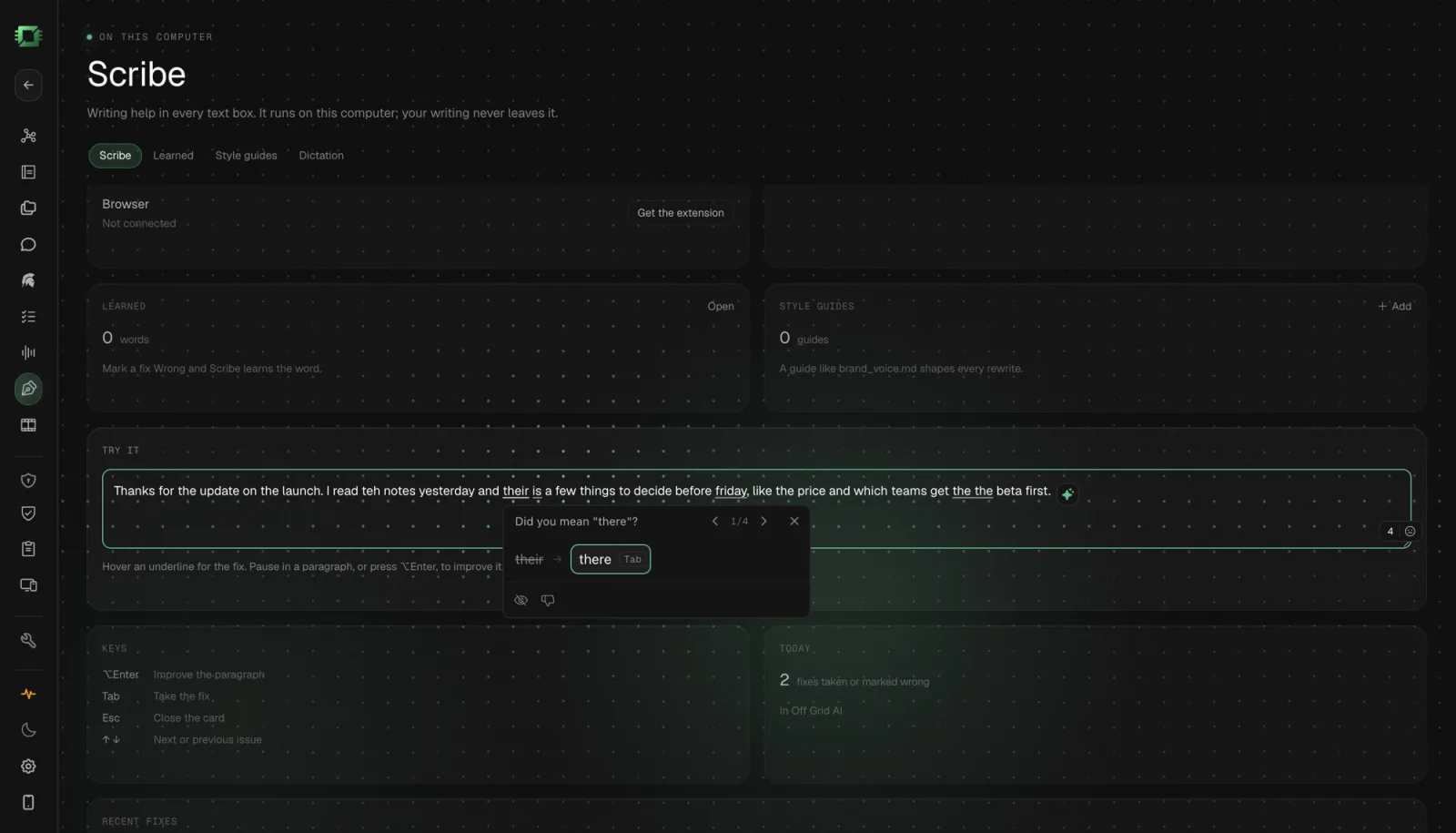
What you get. Scribe underlines spelling and grammar as you type in Mail, Notes, Slack and every text box in Off Grid AI Desktop (OGAD), on Mac, Windows and Linux. Hover an underline and press Tab to take the fix. Select text in any app, your browser included, press Command+Option+Space on a Mac or Ctrl+Alt+Space on Windows and Linux, and a chat model on your computer rewrites it in place.
In Chrome and Firefox, the Off Grid AI extension underlines every text box on the web and has Off Grid AI on your computer check it. On your phone, Scribe checks as you type and rewrites with a model on the phone, on iPhone and Android.
Inside OGAD, a Rewrite card offers Improve, Clearer, Shorter, Longer, Fix grammar, Persuasive and Translate, in a Formal, Casual, Friendly or Confident tone. Add your own brand_voice.md under Style guides and every rewrite follows it. Mark a fix Wrong and Scribe learns the word, and the people and projects in your Off Grid AI memory never get flagged.
Private by design. The Scribe screen says it: “Writing help in every text box. It runs on this computer; your writing never leaves it.” It skips password fields, password managers, terminals and code editors.
What you need. OGAD 0.0.57 or later and Off Grid AI Pro: $34.99 once, a limited-time price down from $119, or $7.99 a month. The same payment covers meetings without a bot, dictation, screen memory and Notes. Setup guides for Mac, Windows and Linux.
Best for. Anyone who writes all day in many apps and wants grammar checks, rewrites and their own voice, with nothing uploaded.
2. Harper
What you get. A free, open-source grammar checker from Automattic under the Apache-2.0 licence. Its site says “Every check happens locally. No cloud round-trips, no telemetry, no LLM in the loop.” There’s a Harper Desktop app for macOS that works across text fields, extensions for Chrome, Edge and Firefox, and plugins for Obsidian, VS Code, Neovim, Zed and WordPress.
Best for. Free, fast English grammar checks, especially for developers and Obsidian users.
The catch. English only. It checks and suggests fixes but doesn’t rewrite with AI.
3. Apple Writing Tools
What you get. Built into macOS with Apple Intelligence. Select text, Control-click and choose Writing Tools to proofread, rewrite in a Friendly, Professional or Concise tone, or summarize. Apple says it works in most places you write, including third-party apps and websites.
Best for. Mac owners who want proofreading with nothing to install.
The catch. Mac only, and only on Macs with Apple Intelligence (M1 or later). Larger requests go to Apple’s Private Cloud Compute, which Apple says doesn’t store your data, and Apple says usage limits may apply.
4. Writing Tools (open source)
What you get. A free app under GPL-3.0 for Windows, macOS 14 and later, and Linux. Select text in any app and press Ctrl+Space to proofread or rewrite it. You choose the AI behind it: cloud services such as Gemini or OpenAI, or a local model through Ollama or llama.cpp.
Best for. Tinkerers who already run a local model server and want a free hotkey rewriter.
The catch. It’s only private if you set up a local model yourself. Its README calls Linux a work in progress with Wayland caveats, and its latest release was 10 May 2026. It works on the text you select, when you press the hotkey.
5. LanguageTool
What you get. A grammar checker for many languages with browser add-ons and apps for Mac and Windows. The free plan checks up to 2,000 characters per text field and gives 3 AI rephrasings a day. It says texts written through the browser add-on are “usually not saved.”
Best for. Writing in languages other than English.
The catch. It checks in LanguageTool’s cloud by default. You can run it as a local server with Java 8 or later (LGPL-2.1), but its docs say the AI-based rules only work in the cloud, and the Windows desktop app can’t use the local server.
Which should you pick?
- You want checks and rewrites everywhere, on any computer, with nothing uploaded: Off Grid AI Pro.
- You want free English checks: Harper.
- You’re on an Apple Intelligence Mac and want nothing extra: Apple Writing Tools.
- You write in many languages: LanguageTool.
Everything in one app
Most apps on this page do one job. Off Grid AI does all of these, on your own computer and phone, in one app.
Free, on every device
- Local chat with open models, no account
- Answers from your files, with the source shown
- Images made on your own GPU
- Voice in and out
- A local API for your own tools
- iPhone and Android with on-device models
Pro, $34.99 once
- Memory of your screens, meetings, mail and docs
- Meetings recorded without a bot, summarised locally
- Dictation into any app on your computer
- Actions in Gmail, Linear, Jira and Notion, only with your yes
- God, a chief of staff that briefs you and preps your meetings
- Web Use and Computer Use for tasks in your own browser and apps
- Reflect: where your time went, by project and person
- Vault, Clipboard and Sync on up to 5 devices
They work together
- A call becomes a transcript. Its decisions become to-dos. The follow-up email waits in Actions for your yes.
- God's morning brief draws on all of it: yesterday's screens, today's meetings, what people owe you.
- Vault fills logins in the same browser where Web Use runs a task, so the agent signs in and your password never goes to a model.
That is a notetaker, a dictation app, a time tracker, a password manager, a clipboard manager and an AI assistant, for one price. Get Pro for $34.99 once
What is the best private alternative to Grammarly? Off Grid AI Pro. Its Scribe feature checks spelling and grammar in every app on Mac, Windows and Linux, rewrites with a model on your own computer and follows your style guide, for one payment. Harper is the best free pick if you only need checks in English.
Does Grammarly send my writing to its servers? Yes. Grammarly’s privacy policy, now published by Superhuman, says it processes your user content to give writing suggestions. The checkers ranked here can do the work on your own computer instead.
Is there a free grammar checker that works offline? Harper. It’s free, open source under Apache-2.0 and runs every check on your device, with a Mac app, browser extensions and editor plugins. It covers English only and doesn’t rewrite with AI.
Can I run LanguageTool locally? Yes. LanguageTool can run as a local server on your computer with Java 8 or later. Its AI-based rules only work in LanguageTool’s cloud, so the local version checks with its standard rules.
Does Apple Writing Tools work offline? Partly. Apple Intelligence runs on your Mac where it can, and sends larger requests to Apple’s Private Cloud Compute, which Apple says doesn’t store your data. It needs a Mac with Apple Intelligence, M1 or later.
Related guides
- How to Check Grammar and Spelling in Every App on Your Mac in 2026 (Private, On-Device)
- How to Rewrite Any Text in Your Own Voice on Your Mac in 2026 (One Shortcut, No Cloud)
- Best Dictation Apps With a One-Time Payment in 2026 (Lifetime Licences Compared, Works Offline)
Get Off Grid AI Pro and turn on Scribe. Your next email gets checked on your own computer.