

On this page
The best Obsidian alternative in 2026 is Off Grid AI Pro, because its Notes feature opens your Obsidian vault as it is and adds AI that runs on your own computer, plus version history and a graph, for one payment. If you want a free Markdown editor for research writing, Zettlr is the pick.
Obsidian keeps your notes as Markdown files, and that’s worth keeping. The apps below do the same, so you’re never locked in. What changes is what sits around the files: AI that checks and rewrites on your machine, history you can restore, and whether your vault opens without an import.
We make Off Grid AI. Every rival fact below comes from that app’s own pages or GitHub, checked 16 November 2026.
Get Pro for $34.99 once · Download Off Grid AI
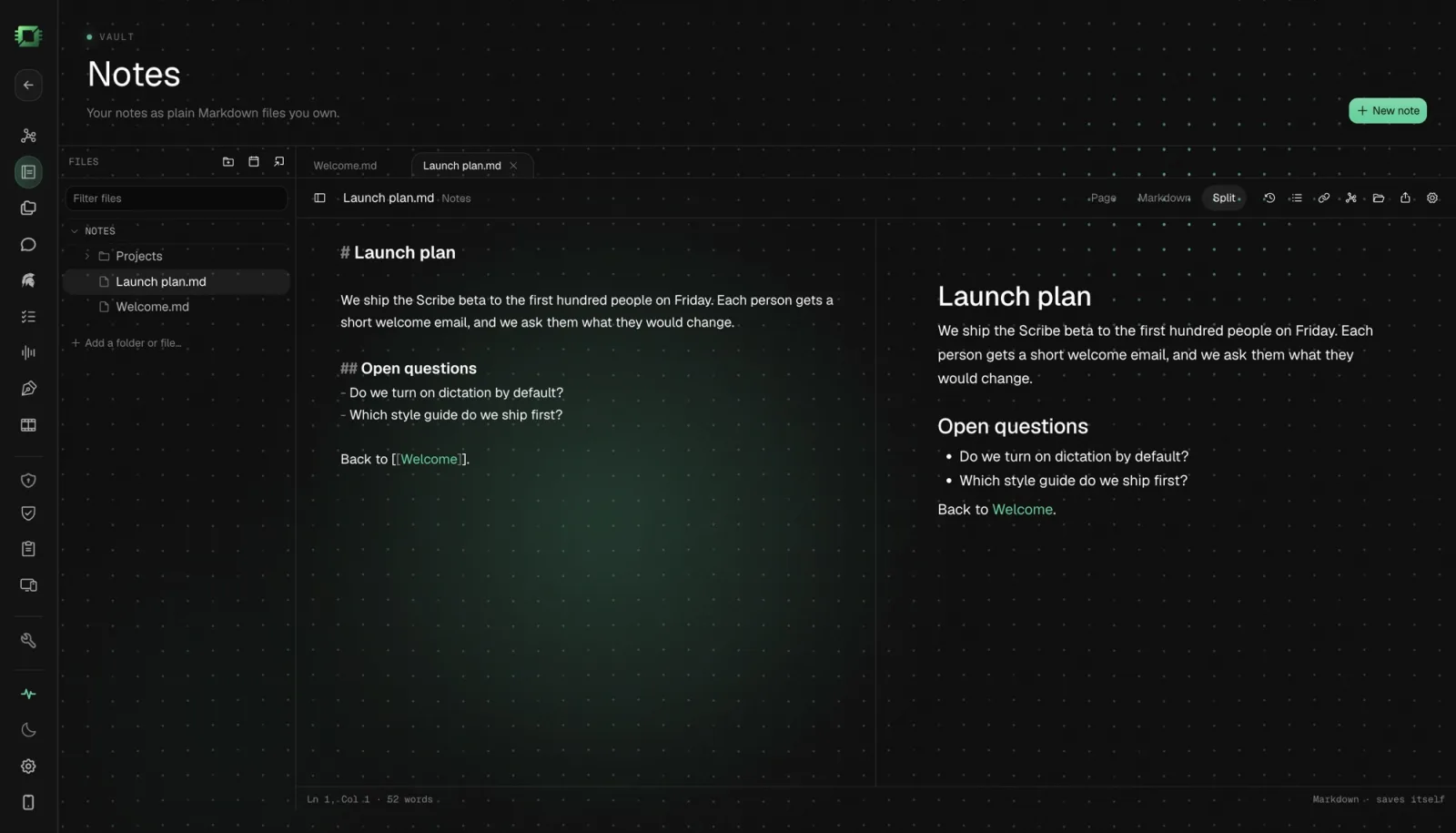
The Markdown note apps compared
| Price | Platforms | Notes stored as | Opens an Obsidian vault | AI | |
|---|---|---|---|---|---|
| Off Grid AI Pro (Notes) | $34.99 once, up to 5 devices | Mac (Apple silicon), Windows, Linux, iPhone, Android | Plain Markdown files | Yes, as it is | On your computer |
| Logseq | Free, open source (AGPL-3.0) | Desktop and mobile | Markdown files, with a database version in beta | Not listed | Not listed |
| Zettlr | Free, open source (GPL-3.0) | Windows, Mac, Linux | Files on your computer | Opens any folder of Markdown | Not listed; LanguageTool for grammar |
| Joplin | App open source; Joplin Cloud from €2.40 a month billed yearly | Windows, Mac, Linux, Android, iOS | Notes in Markdown or rich text, end-to-end encrypted sync | Not listed | Joplin Cloud AI (beta), hosted by Joplin Cloud |
| Obsidian, for reference | Free; Sync $4 a month billed yearly | Windows, Mac, Linux, Android, iOS | Plain Markdown files | It’s the original | Not built in |
Sources: Logseq on GitHub (2.0.2 beta, 7 October 2026); Zettlr and GitHub (v4.10.0, 13 November 2026); Joplin and Joplin plans; Obsidian pricing.
1. Off Grid AI Pro (Notes)
What you get. Notes, in Off Grid AI Desktop (OGAD), keeps a Markdown library on your computer and opens your Obsidian vaults as they are. The first time you open it, it offers the vaults Obsidian already knows about. It reads your files where they are, leaves the .obsidian folder alone, and picks up changes Obsidian makes, so you can run both on one vault.
Write in Page, Markdown or Split view. Type [[ to link a note, [[Note# to link a heading, and # for tags. Backlinks shows what links here and the unlinked mentions, Outline lists headings, and Graph draws the whole library. Today’s note gives you a daily log, and Command+O finds any file.
What it adds. History keeps earlier versions of every file it writes, by day, with Changes since, Restore and Copy. Scribe checks spelling and grammar as you type, on your computer, and improves a paragraph when you pause or press Option+Enter. Hold Option+Space (Alt+Space on Windows and Linux) to dictate, and your words land as Markdown. Chat in Off Grid AI can answer from your notes. None of it leaves your computer.
What you need. OGAD 0.0.57 or later and Off Grid AI Pro: $34.99 once, a limited-time price down from $119, or $7.99 a month. The same payment covers meeting notes without a bot, dictation into any app, screen memory and Scribe. Setup guides for Mac, Windows and Linux.
On your phone. Notes on iPhone and Android writes the same Markdown files and syncs them with your computer, device to device over your own network, with no notes server in between.
Best for. Obsidian users who want AI in their notes without sending them anywhere, and who’d rather not migrate.
2. Logseq
What you get. A free, open-source outliner under AGPL-3.0 that calls itself privacy-first. Every line is a block you can link and reference, with daily journal pages built in.
Best for. People who think in outlines and daily journals.
The catch. Logseq is moving to a database version, and 2.0.2 is a beta of it. Its README warns that data loss is possible in the database beta.
3. Zettlr
What you get. A free Markdown editor for Windows, Mac and Linux under GPL-3.0. Its site says “all files stay on your computer.” It has note IDs, wiki-style links and a graph view, and it works with Zotero and JabRef for citations.
Best for. Academic and long-form writers who cite sources.
The catch. Its site lists no built-in AI. Grammar checks come through LanguageTool.
4. Joplin
What you get. An open-source note app for Windows, Mac, Linux, Android and iOS, with a Markdown or rich-text editor and end-to-end encrypted sync. Joplin Cloud starts at €2.40 a month billed yearly.
Best for. People who want the same notes on every phone and computer, with sync they can trust.
The catch. Its AI, Joplin Cloud AI, is in beta and uses a chat model hosted by Joplin Cloud, so your notes go to that service when you use it.
Which should you pick?
- You have an Obsidian vault and want local AI, history and grammar in it: Off Grid AI Pro.
- You write papers with citations: Zettlr.
- You think in outlines: Logseq.
- You need the same notes on your phone, with encrypted sync: Joplin.
Everything in one app
Most apps on this page do one job. Off Grid AI does all of these, on your own computer and phone, in one app.
Free, on every device
- Local chat with open models, no account
- Answers from your files, with the source shown
- Images made on your own GPU
- Voice in and out
- A local API for your own tools
- iPhone and Android with on-device models
Pro, $34.99 once
- Memory of your screens, meetings, mail and docs
- Meetings recorded without a bot, summarised locally
- Dictation into any app on your computer
- Actions in Gmail, Linear, Jira and Notion, only with your yes
- God, a chief of staff that briefs you and preps your meetings
- Web Use and Computer Use for tasks in your own browser and apps
- Reflect: where your time went, by project and person
- Vault, Clipboard and Sync on up to 5 devices
They work together
- A call becomes a transcript. Its decisions become to-dos. The follow-up email waits in Actions for your yes.
- God's morning brief draws on all of it: yesterday's screens, today's meetings, what people owe you.
- Vault fills logins in the same browser where Web Use runs a task, so the agent signs in and your password never goes to a model.
That is a notetaker, a dictation app, a time tracker, a password manager, a clipboard manager and an AI assistant, for one price. Get Pro for $34.99 once
What is the best Obsidian alternative with local AI? Off Grid AI Pro. Its Notes feature opens your Obsidian vault as it is, adds wikilinks, backlinks, tags, a graph and version history, and checks your writing with AI that runs on your computer. Chat can answer from your notes too.
Can I switch from Obsidian without moving my notes?
Yes, with Off Grid AI Notes. It offers the vaults Obsidian already knows about, reads the Markdown files where they are and leaves the .obsidian folder alone, so you can keep using both.
Which free note apps keep notes as files on my computer? Zettlr keeps your Markdown files where you put them and is free under GPL-3.0. Logseq is free and open source under AGPL-3.0. Joplin is open source too, with an optional paid cloud.
Does Obsidian cost anything? The app is free. Obsidian Sync is $4 a month per user billed yearly, Publish is $8 a month per site billed yearly, and an optional commercial licence is $50 a year per user.
Do these apps send my notes to an AI service? Off Grid AI runs its AI on your computer. Joplin Cloud AI, in beta, uses a chat model hosted by Joplin Cloud. Zettlr and Logseq don’t list built-in AI on their sites.
Related guides
- How to Get Back Deleted Text in Your Markdown Notes on Your Mac in 2026 (Automatic Version History)
- How to Chat With Your Obsidian Notes in 2026 Without Uploading Them
- Best Private Grammarly Alternatives in 2026 (Grammar Checks That Stay on Your Computer)
Get Off Grid AI Pro, click Notes, and open the vault you already have.