

On this page
You can rewrite text in any app on your Android phone with AI that never leaves it. Off Grid AI Pro adds Improve to Android’s text selection menu: select text in Chrome, Gmail or any app, tap Improve, and a model on your phone writes a better version that goes straight back in place.
No copy and paste between apps, and nothing sent to a server.
Get Pro for $34.99 once · Download Off Grid AI
What you need
- Off Grid AI 0.0.124 or later on your Android phone, from the download page.
- Off Grid AI Pro. Enter your licence key in the app and tap Activate. Pro is $34.99 once, a limited-time price down from $119, or $7.99 a month, for up to 5 devices.
- A text model, downloaded in Models. Improve uses it to write your new versions.
Step 1: Select text and tap Improve
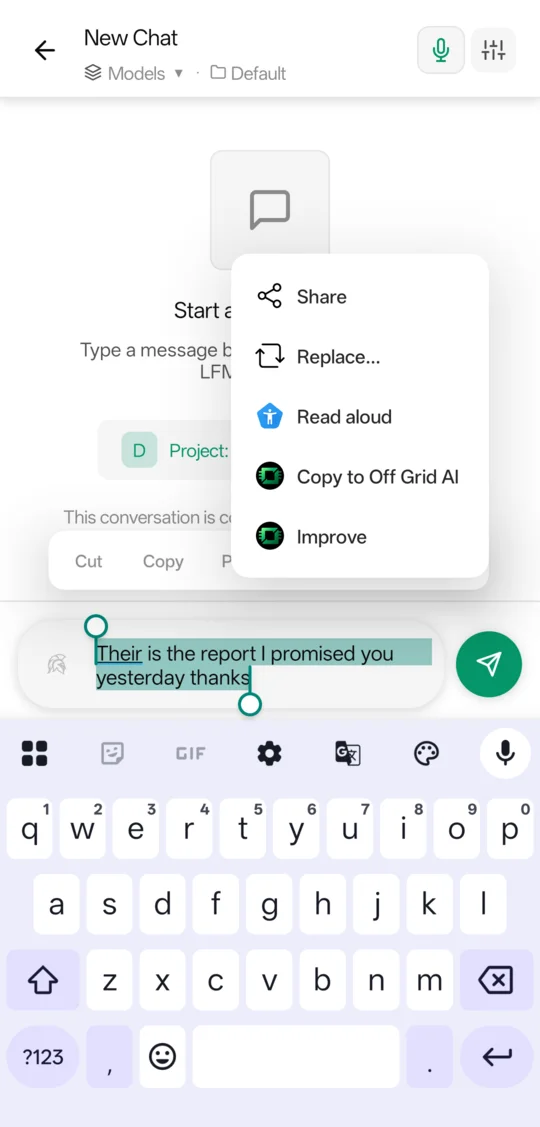
- In any app, select the text you want to change.
- In the menu that pops up, open the extra options, usually the three dots.
- Tap Improve.
Step 2: Pick a version
The Improve screen opens with your text at the top.
- The quick fix comes first, with how many mistakes it fixed, such as “1 fixed”.
- Your model then writes a better version, on your phone.
- Choose under Change: Improve, Clearer, Shorter, Longer, Fix grammar or Persuasive.
- Choose a Tone if you like: Formal, Casual, Friendly or Confident.
- Tap Another version for a fresh take.
If your model is slow for this, Improve suggests a quicker one you can get in one tap.
Step 3: Replace
Tap the version you want, then Replace. Off Grid AI closes and your new text sits where your selection was, in Chrome, in a reply, in a form.
Where the app doesn’t let you edit the text, the button reads Copy instead. Tap it and paste where you need it.
Fix spelling as you type
Inside Off Grid AI, Scribe underlines spelling and grammar as you type a message. Put the cursor on an underlined word and a bar above the keyboard offers up to three fixes. Tap one to take it, the book to add the word to your dictionary, or the × to ignore it. That works without a model.
Select text in the chat box and the bar offers Improve too.
What stays on your phone
Checks and rewrites run on your phone with the model you downloaded. If you pair it with Off Grid AI Desktop, the words Scribe has learned sync between them over your own network.
If something doesn’t work
| What you see | Why | Fix |
|---|---|---|
| No Improve in the menu | Off Grid AI or Pro isn’t set up | Install Off Grid AI, then enter your licence key and tap Activate |
| “Rewrites need a text model.” | No text model is downloaded | Download one in Models |
| The button says Copy, not Replace | The app’s text can’t be edited | Tap Copy and paste it in |
FAQ
How do I rewrite text in any app on Android without the cloud? Install Off Grid AI with Pro and download a text model. Select text in any app, tap Improve in the selection menu, pick a version, and tap Replace. The model runs on your phone.
Does the new text go back into the app? Yes, in apps that let you edit the text, such as Chrome. Replace puts it where your selection was. Where the text can’t be edited, Improve offers Copy instead.
Where is Improve in the menu? Select text, then open the menu’s extra options, usually the three dots. Off Grid AI adds Improve there, next to Copy to Off Grid AI.
Does it check spelling too? Yes. In Off Grid AI, Scribe underlines spelling and grammar as you type, with up to three fixes above the keyboard. That works without a model.
What do I need? An Android phone with Off Grid AI 0.0.124 or later, an Off Grid AI Pro licence, and a text model downloaded for rewrites.
Related guides
- How to Keep Private Notes on Your Android Phone That Sync With Your Computer in 2026 (Plain Markdown, No Cloud)
- How to Check Grammar and Spelling in Every App on Windows in 2026 (Private, On-Device)
- Best Private Grammarly Alternatives in 2026 (Grammar Checks That Stay on Your Computer)
Get Off Grid AI Pro, select some text, and tap Improve.