

On this page
You can check grammar in Chrome and Firefox without sending a word to a grammar company’s servers. The Off Grid AI extension underlines spelling and grammar in every text box on the web, and Off Grid AI Desktop on your own computer does the checking. Hover an underline and press Tab to take the fix, or select a paragraph and have it rewritten.
The extension sends your text only to the Off Grid AI app on the same computer. In its own words: “Text is checked by Off Grid AI on this computer. Nothing goes anywhere else.”
Get Pro for $34.99 once · Download Off Grid AI
What you need
- Off Grid AI Desktop 0.0.57 or later on your Mac, Windows PC or Linux machine, with Scribe on. Get it from the download page.
- Off Grid AI Pro, built into the desktop app. Pro is $34.99 once, a limited-time price down from $119, or $7.99 a month, for up to 5 devices.
- The Off Grid AI extension 0.0.7 or later for Chrome or Firefox, from the download page.
Step 1: Pair the extension with the app
Open the extension, go to Settings, then Desktop, and select Pair with desktop. Check that the six words match the dialog in Off Grid AI Desktop, and approve there.
Keep Off Grid AI Desktop running. If it’s closed, Scribe’s badge says “Open Off Grid AI to check writing”.
Step 2: Let it check every site
Click in a text box, like a Gmail reply. Scribe’s badge appears in the corner of the box. The first time you click it, Scribe asks to Check writing on every site. Allow it once and it works on every site from then on.
Step 3: Take the fixes
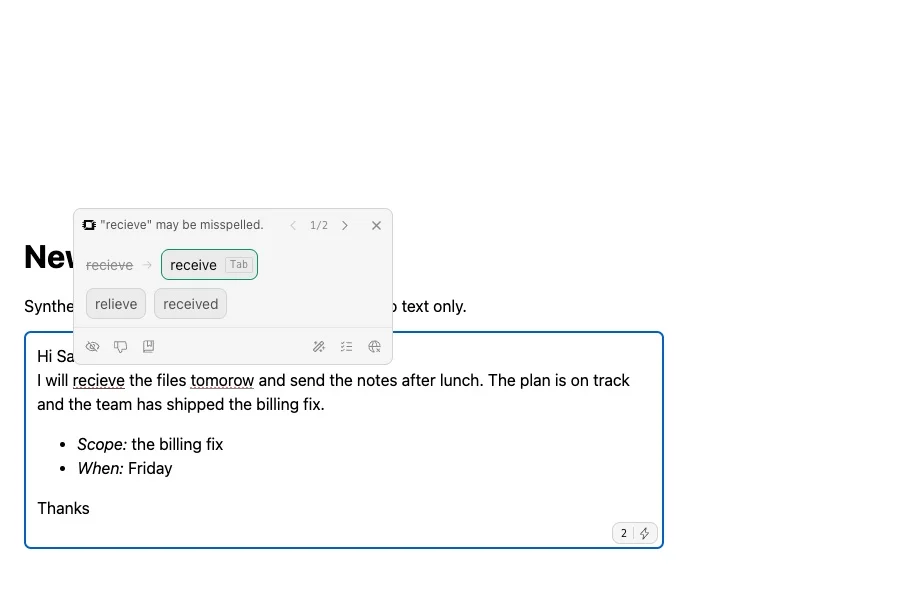
Mistakes get underlined as you type. Hover one and a card shows the fix:
- Press Tab to take it, or click another suggestion.
- Use the arrows on the card to move between issues.
- Mark a fix wrong and Scribe learns the word, the same as on the desktop.
The badge counts what’s left, such as “2 writing issues”.
Step 4: Rewrite a paragraph
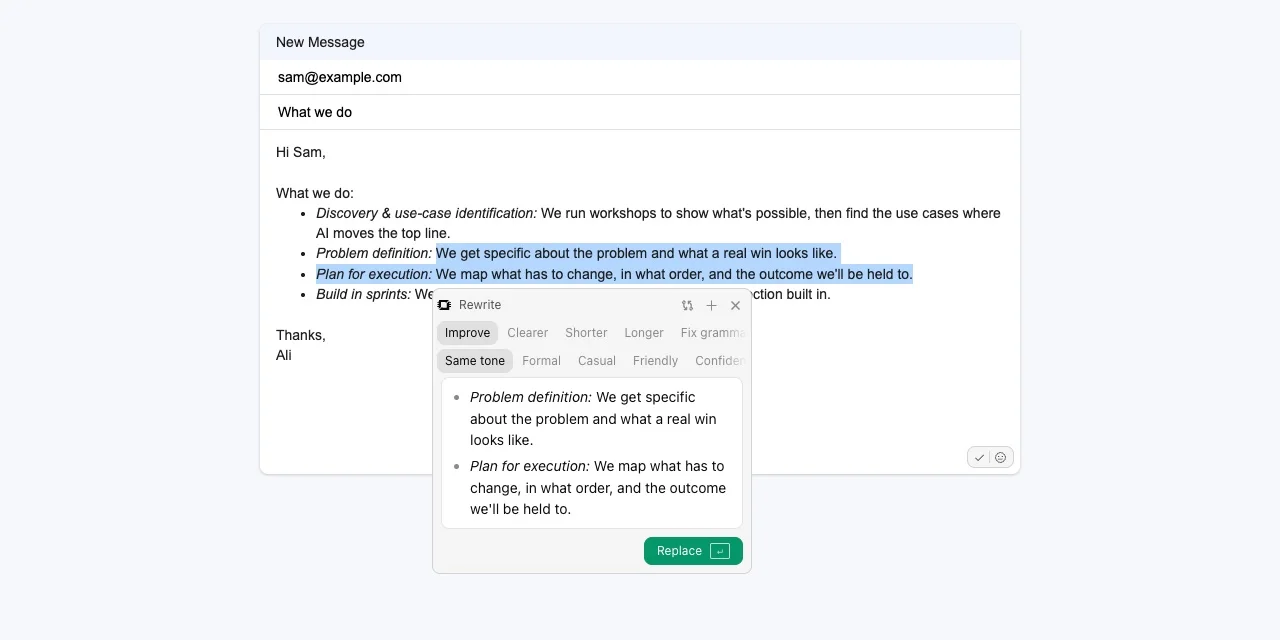
Select text on the page and click Rewrite. The Rewrite card offers Improve, Clearer, Shorter, Longer and Fix grammar, in the Same tone or a Formal, Casual, Friendly or Confident one. A chat model running in Off Grid AI Desktop writes the new version, keeping your lists and formatting. Click Replace to put it in.
On pages that draw their own text, where Scribe can’t underline, select the text and right-click to rewrite it.
Step 5: Review a whole draft
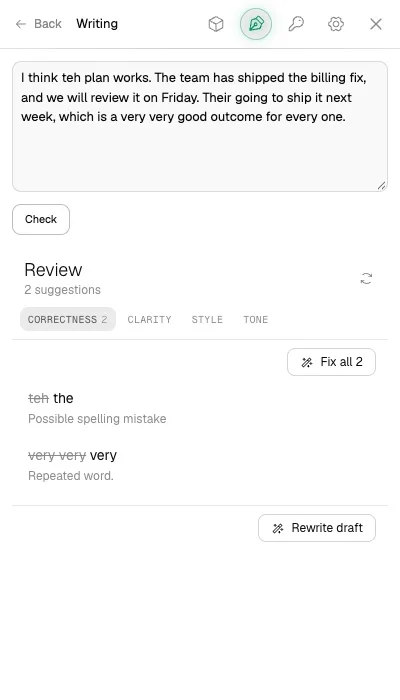
Open the extension’s side panel and choose Writing. Paste or type a draft into the box and click Check. The Review lists every suggestion, sorted into Correctness, Clarity, Style and Tone. Click Fix all to take them at once, or Rewrite draft for a new version of the whole thing.
Turn it off on one site
In Scribe’s card, choose Not on this site. Scribe goes quiet there and says “Off on this site. Turn it back on in Settings.”
If something doesn’t work
| What you see | Why | Fix |
|---|---|---|
| “Open Off Grid AI to check writing” | The desktop app isn’t running | Open Off Grid AI Desktop |
| The badge asks you to pair | The extension isn’t paired | Settings, Desktop, Pair with desktop |
| No underlines on one site | Scribe is off there | Turn the site back on in the extension’s Settings |
| Rewrite asks for a model | No chat model is loaded in the desktop app | Download one in Models in Off Grid AI Desktop |
FAQ
Is there a grammar checker for Chrome that doesn’t send my text to a server? Yes. The Off Grid AI extension underlines spelling and grammar in Chrome and Firefox, and sends your text only to Off Grid AI Desktop on your own computer to be checked. Nothing goes anywhere else.
Does it work in Gmail and other web apps? Yes. It checks the text boxes on any site once you allow Check writing on every site. Where a page draws its own text, select the text and right-click to rewrite it.
Can it rewrite text, not just fix it? Yes. Select text on a page and click Rewrite. Choose Improve, Clearer, Shorter, Longer or Fix grammar, a tone if you like, then Replace.
Can I turn it off on one site? Yes. Choose Not on this site in Scribe’s card. Turn it back on in the extension’s Settings.
What do I need? Off Grid AI Desktop 0.0.57 or later with Pro, running on your Mac, Windows PC or Linux machine, and the Off Grid AI extension 0.0.7 or later in Chrome or Firefox, paired with it.
Related guides
- How to Check Grammar and Spelling in Every App on Your Mac in 2026 (Private, On-Device)
- How to Use Local AI in Firefox in 2026 Without Moving to Another Browser
- Best Private Grammarly Alternatives in 2026 (Grammar Checks That Stay on Your Computer)
Get Off Grid AI Pro, add the extension, and your next Gmail reply gets checked on your own computer.